Author: Jim Stephenson

  • The Building Blocks of Fun: Surprising LEGO Facts You Never Knew!

    The Building Blocks of Fun: Surprising LEGO Facts You Never Knew!

    Lego is a Danish company that has been manufacturing toy bricks since 1932. Formerly known as Automatic Binding Bricks, the company has grown into one of the largest toy manufacturers in the world, with a presence in over 140 countries. The Lego Group is known for its innovative designs and commitment to sustainability. In this blog post, we will take a closer look at the history of Lego and what they do.

    Key Lego Facts and Statistics

    • The Lego Group earned almost 65 billion Danish Krone (US$ 9.7 billion) in revenue in 2022 [1].
    • The Lego Group’s gross margin averaged at about 68.8% for the year 2022 [1],[2].
    • More than 40 billion Lego bricks or pieces are scattered all around the world[10],[11].
    • Retailers sell 7 Lego figures or set every second [10],[11].
    • Lego factories produce more than 3.1 million Lego bricks every day [12].
    • Chrome Black is the rarest Lego brick in the world. This can only be found in a single set of Lego Star Wars [14].
    • Rare Lego sets are worth more than a thousand dollars. As of 2020, the most expensive Lego set is The Space Command Centre, valued at more than $10,000.
    • Since 1949, Lego factories produced more than 600 billion Lego bricks and parts [16].
    • The largest Lego model ever built was a life-size X-Wing Starfighter in 2013. This Starfighter is made up of more than 86 Lego sets from various Star Wars minifigures and comprised more than 5 million bricks [16].
    • The Lego Movie earned $469 million worldwide in 2014 [16]. Even as a movie, the largest toy company doesn’t disappoint when it comes to giving people a good time and a good laugh.

    History of Lego

    Lego Bricks Lego Facts

    Lego was founded in 1932 by Ole Kirk Christiansen, a carpenter who began making wooden toys in his workshop in Denmark. The name Lego comes from the Danish words “leg godt,” which means “play well.” In 1934, the company began producing plastic toys, including the first version of the Lego brick.

    The modern Lego brick was patented in 1958, and since then, the company has continued to innovate and expand its product line. Lego sets have become increasingly complex and detailed, with themes ranging from classic Lego City sets to licensed themes such as Star Wars, Marvel, and Harry Potter.

    What Lego Does

    Lego produces a wide range of products, including building sets, video games, and movies. The company’s primary product is its iconic building bricks, which can be used to create virtually any structure or design.

    Lego sets are designed to encourage creativity and problem-solving skills in children and adults alike. Building with Lego bricks requires imagination, planning, and spatial reasoning, making it a valuable tool for learning and development.

    In addition to its core products, Lego has also been a pioneer in sustainability. The company has set ambitious goals to reduce its carbon footprint and waste, and has made significant investments in renewable energy and sustainable materials. Lego bricks are made from a durable plastic called ABS, which can be recycled and reused in other products.

    Lego Revenue Statistics

    Lego Group Revenue Lego Facts

    The Lego company has done well over the last decade or so. Given the number of Lego minifigures and models proliferating the different toy stores all over the world, just how much money is Lego making?

    • The Lego Group generated almost 65 billion Danish Krone (US$ 9.7 billion) in revenue in 2022, which was an increase from the previous year’s 55 billion Danish Krone (US$8.5 billion) [1].
    • In line with the revenue generated for 2022, the Lego Group’s gross margin hovered at about 68.8% [1],[2].
    • Their total expenses for the year 2022 amounted to 46.7 billion Danish Krone (US$6.7 billion), bringing their operating profit close to 18 billion Danish Krone (US$2.6 billion) [5],[7].
    • As of 2023, Lego is ranked as the most valuable toy brand in the world, valued at US$7.4 billion. Following in second place is Bandai Namco valued at US$1.6 billion [8].
    • In 2021, Lego had the highest annual revenue amongst select toy companies in the world. For that year, their recorded revenue hovered at about US$8.5 billion. Bandai Namco followed in second place with US$7.3 billion for the same year [9].

    More Interesting Lego Facts and Statistics

    Judging from their profits from last year and the years before, it’s clear that Lego sells a lot of figures around the world. For this section, we’ll cover the most interesting Lego statistics for Lego minifigures, number of Lego bricks sold, and more…

    • There are more than 40 billion Lego bricks or pieces around the world. And retailers sell 7 Lego figures or set every second, so given the math, this number checks out [10],[11].
    • If you divide the number of Lego bricks by the world population, each person around the world would have more than 80 Lego Bricks. If you stack these Lego bricks together, you’d have enough Lego bricks to build a tower that could reach the moon [10],[11].
    • The Lego Group produces more than 3.1 million Lego bricks every day [12].
    • We know that there are more than 4 billion Lego Bricks in existence, and growing. But did you know that you can combine a set of 6×24 Legos in more than 915 million ways [13]?
    • The rarest Lego brick is the Chrome Black. Lego produces more than 50 different colors for their bricks, but the rarest one can only be found in a single set of Lego Star Wars [14].
    • Some of the rare Lego sets are valued at more than a thousand dollars. As of 2020, the most expensive Lego set is The Space Command Centre, valued at more than $10,000.
    • Since 1949, Lego factories produced more than 600 billion Lego bricks and parts [16].

    It’s surprising to know that Lego sells enough Lego bricks to build a tower that could reach the moon. At the same time, these fun Lego facts above are a testament to just how big the Lego group is.

    Lego And Pop Culture

    Lego Star Wars Lego Facts

    There’s also no denying that the Lego group likes to work with various movie and TV franchises. From F.R.I.E.N.D.S. to Harry Potter to Star Wars, there’s probably Lego minifigures on your favorite shows or movies.

    Having said that, the impact that pop culture has on Lego is nothing short of extraordinary. Here are some interesting facts and statistics that show how big Lego is in terms of pop culture influence.

    • A life-size X-Wing Starfighter was the largest Lego model ever built in 2013. This Starfighter took more than 86 Lego sets from various Star Wars minifigures and comprised more than 5 million bricks [16].
    • The Lego Movie earned $469 million worldwide in 2014 [16]. Even as a movie, the largest toy company doesn’t disappoint when it comes to giving people a good time and a good laugh.
    • The world’s tallest Lego tower measures more than 114 ft tall and is comprised of more than 550,000 Lego bricks [13].
    • The largest Star Wars Lego set is the Millenium Falcon and costs more than $4,500. The Lego Taj Majal is the second-largest set right after the Millenium Falcon [17].

    The Wrap Up

    That wraps up our article for the most interesting Lego facts and statistics that prove just how successful this toy company is. From knowing how many Lego sets are sold to the number of Lego bricks around the world, the numbers will continue to surprise us later down the line.

    Reference

    [1] https://www.statista.com/statistics/282870/lego-group-revenue/

    [2] https://www.statista.com/statistics/1103041/lego-gross-margin-worldwide/

    [3] https://www.statista.com/statistics/1380868/lego-group-expenses/

    [4] https://www.statista.com/statistics/1103043/lego-revenue-growth-worldwide/

    [5] https://www.statista.com/statistics/1103044/lego-gross-profit-worldwide/

    [6] https://www.statista.com/statistics/292286/lego-group-operating-profit/

    [7] https://www.statista.com/statistics/292305/lego-group-net-profit/

    [8] https://www.statista.com/statistics/399131/value-of-the-leading-global-toy-brands/

    [9] https://www.statista.com/statistics/241241/revenue-of-major-toy-companies-worldwide/

    [10] https://www.fi.edu/sites/default/files/PressKit_ArtOfTheBrick_Quirky_LEGO_Facts.pdf

    [11] https://www.natgeokids.com/nz/kids-club/entertainment/general-entertainment/ten-top-lego-facts/

    [12] https://www.greenmatters.com/p/lego-recycled-plastic-bricks

    [13] https://mamainthenow.com/fun-lego-facts/

    [14] https://facts.net/lego-facts/

    [15] https://tinybeans.com/lego-most-valuable-sets/

    [16] https://blog.gitnux.com/lego-statistics/

    [17] https://wealthygorilla.com/most-expensive-lego-sets/
  • Our Top 5 Best Work Station Motherboards (Jul 2026)

    Our Top 5 Best Work Station Motherboards (Jul 2026)

    There’s a fine line between making the right choices and the wrong ones when building a PC. The first choice being: do you go for Intel motherboards or AMD motherboards? It mostly depends on what kind of CPU you want to run with. Then you’ll have other choices to consider before you purchase a motherboard:

    • Connectivity issues
    • Design and build
    • Number of available slots

    And the list goes on…

    From more than half a dozen brands in the market right now, we’re going to help pick out the best motherboards for your workstation needs.

    What Are The Best Work Station Motherboards?

    Gamers and creative professionals need robust motherboards with great reliability. Gaming, rendering, animation tasks, and other heavy workloads need a powerful CPU-GPU combo. But that’s only made possible if the motherboard can hold these two together.

    With that being said, what are the best workstation motherboards and what can we recommend?

    Gigabyte X570 Aorus Ultra

    A Solid All-Around AMD X570 Motherboard

    Gigabyte X570 Aorus Ultra Work Station Motherboard

    Up first, we have the Gigabyte X570 Aorus Ultra, it’s a high-end motherboard for gaming and creative work. The Gigabyte X570 Aorus Ultra is based on the AMD X570 chipset and is compatible with AMD Ryzen processors.

    The Gigabyte X570 Aorus Ultra has a sleek black PCB with silver accents and a heatsink covering the IO shield. It has a standard ATX form factor, which means it will fit into most cases that support ATX motherboards. The Gigabyte X570 Aorus Ultra is known for its excellent build quality with solid capacitors and robust heat sinks on the VRM.

    The Gigabyte X570 Aorus Ultra supports AMD processors, including AMD Ryzen 5000, 4000 G-Series, and Ryzen 3000 processors. It has an AM4 socket, which means it can accommodate any processor with an AM4 socket.

    The motherboard has four DDR4 DIMM slots supporting up to 128GB of memory as well as supporting memory speeds up to 4400 MHz in overclocking mode, which is expected for a high-end motherboard.

    The Gigabyte X570 Aorus Ultra has three PCIe 4.0 x16 slots, two PCIe 4.0 x1 slots, and two M.2 slots. The PCIe 4.0 x16 slots can accommodate two graphics cards in CrossFireX or SLI mode for maximum gaming performance.

    The Gigabyte X570 Aorus Ultra has six SATA III ports, accommodating up to six SATA III storage drives. It also has two M.2 slots that support NVMe SSDs for faster data transfer speeds.

    The Gigabyte X570 Aorus Ultra has Gigabit Ethernet and 7.1-channel HD audio. It also has built-in Wi-Fi 6 and Bluetooth 5.0 for wireless connectivity. It has six USB 3.2 Gen 1 ports, four USB 3.2 Gen 2 ports, and two USB 2.0 ports.

    MSI MAG Z490 Tomahawk

    Best Intel Z490 Motherboard

    MSI MAG Z490 Tomahawk Work Station Motherboard

    The MSI MAG Z490 Tomahawk is a high-end ATX motherboard for gaming and high-performance computing. It is based on the Intel Z490 chipset and is compatible with the latest 10th-generation Intel processors. Here is a detailed review of the MSI MAG Z490 Tomahawk motherboard.

    The MSI MAG Z490 Tomahawk supports Intel processors, including 10th-generation Comet Lake processors. It has an LGA 1200 socket, which means it can accommodate any processor with an LGA 1200 socket.

    The MSI MAG Z490 Tomahawk has four DDR4 DIMM slots that support up to 128GB of memory and up to 4800 MHz in overclocking mode. You’re also getting two PCIe 3.0 x16 slots, two PCIe 3.0 x1 slots, and a single M.2 slot. The PCIe 3.0 x16 slots can handle two graphics cards in CrossFireX or SLI mode for maximum gaming performance.

    The MSI MAG Z490 Tomahawk has six SATA III ports, accommodating up to six storage drives. It also has two M.2 slots that support NVMe SSDs for faster data transfer speeds.

    The motherboard has Gigabit Ethernet and 7.1-channel HD audio. It has six USB 3.2 Gen 1 ports, two USB 3.2 Gen 2 ports, and two USB 2.0 ports. It also has built-in Wi-Fi 6 and Bluetooth 5.1 for wireless connectivity.

    MSI MAG B660 Tomahawk Wi-Fi

    Best Pick For Intel B660 Motherboards

    MSI MAG B660 Tomahawk Wi-Fi Work Station Motherboard

    The MSI MAG B660 Tomahawk Wi-Fi is a high-end ATX motherboard for gamers and creative professionals. It uses the B660 chipset and is compatible with the latest Intel Core processors. Here is a detailed review of the MSI MAG B660 Tomahawk Wi-Fi motherboard:

    The MSI MAG B660 Tomahawk Wi-Fi dons a black PCB with silver and gray accents. Because it has a standard ATX form factor, it fits most cases supporting ATX motherboards.

    The MSI MAG B660 Tomahawk Wi-Fi supports Intel Core processors, including 12th-generation Alder Lake processors. It has an LGA 1700 socket, which means it can accommodate any processor with an LGA 1700 socket.

    The motherboard has four DDR5 DIMM slots that support up to 128GB of memory with memory speeds up to 4800 MHz in overclocking mode. The MSI MAG B660 Tomahawk Wi-Fi has two PCIe 5.0 x16 slots, one PCIe 4.0 x4 slot, and two PCIe 3.0 x1 slots.

    For storage, you’re getting six SATA III ports, accommodating up to six SATA III storage drives. It also has three M.2 slots that support NVMe SSDs for faster data transfer speeds.

    The motherboard has Gigabit Ethernet and 7.1-channel HD audio. It has six USB 3.2 Gen 1 ports, two USB 3.2 Gen 2 ports, and two USB 2.0 ports. It also has built-in Wi-Fi 6E and Bluetooth 5.2 for wireless connectivity.

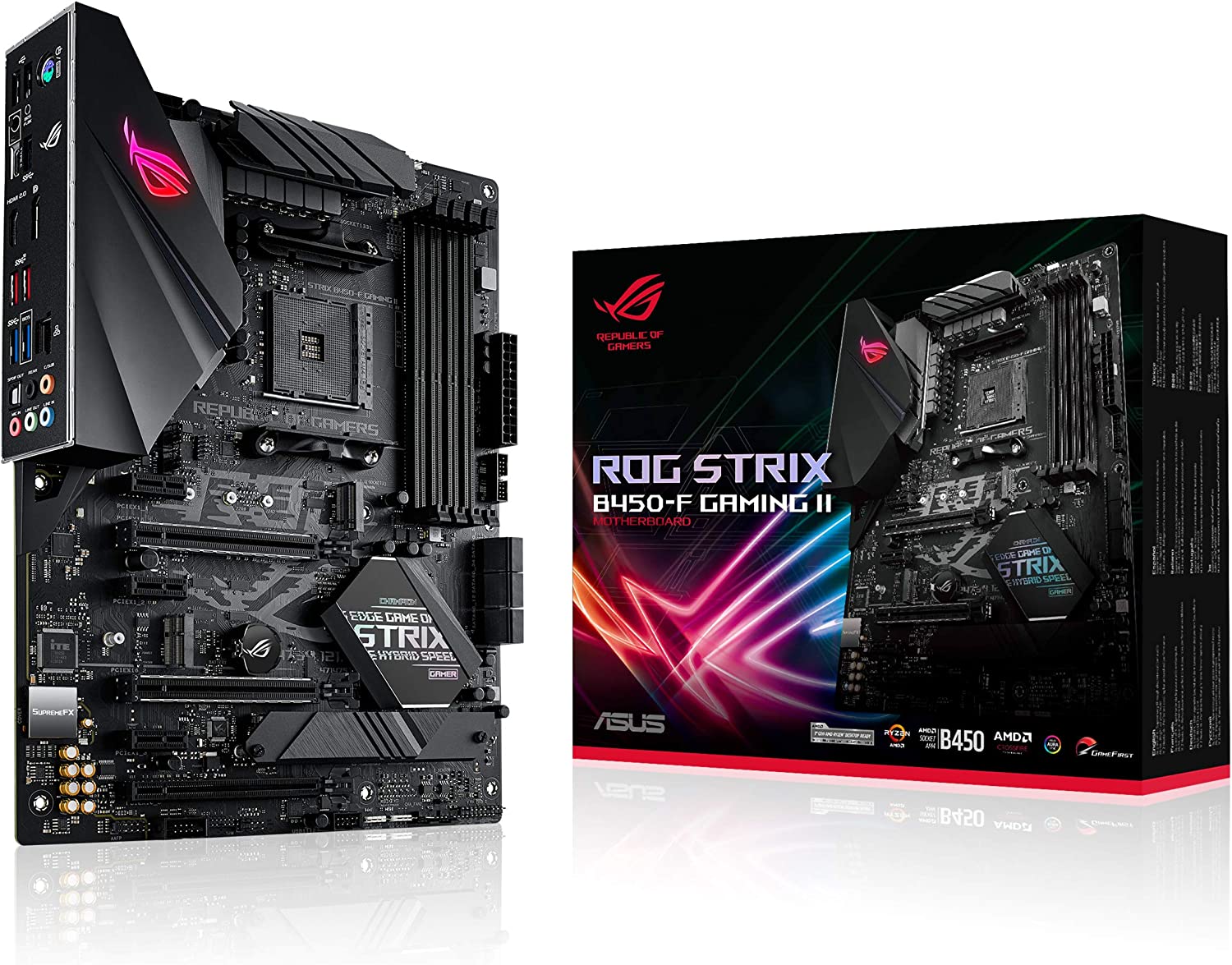
    ASUS ROG Strix B450-F

    High Performance Motherboard

    ASUS ROG Strix B450-F Work Station Motherboard

    The ASUS ROG Strix B450-F Gaming is a high-end ATX motherboard for gaming enthusiasts. It is based on the AMD B450 chipset and is compatible with the latest AMD Ryzen processors.

    The B450-F supports AMD Ryzen series processors, including the 1st, 2nd, and 3rd generations of Ryzen CPUs. This makes it a versatile option for a workstation motherboard, as Ryzen processors are known for their strong performance in multitasking and workstation applications.

    The B450-F supports up to 64GB of DDR4 memory, with speeds of up to 3200MHz, so powering through various applications shouldn’t be a problem.

    The B450-F offers different expansion options, including two PCIe x16 slots for graphics cards, one PCIe x1 slot, and six SATA 3.0 ports for storage devices. This allows you to configure your workstation with multiple graphics cards or storage devices, depending on your specific needs.

    The B450-F features Gigabit Ethernet support, which provides fast and reliable networking for workstation applications requiring data transfer. It also includes Wi-Fi connectivity, which is especially useful for remote workers or those needing to connect to a wireless network.

    The B450-F also features high-quality audio, thanks to the inclusion of the Realtek S1220A audio codec. This provides 7.1-channel surround sound, making it a good choice for multimedia workstations that require high-quality audio output. The B450-F features ASUS’s 5-Way Optimization technology, allowing easy and safe overclocking of the CPU and memory. This can boost performance for workstation applications requiring high processing power.

    Gigabyte B450M DS3H

    Best Budget Alternative

    Gigabyte B450M DS3H Work Station Motherboard

    The Gigabyte B450M DS3H is a Micro ATX motherboard and supports AMD Ryzen series processors, including the 1st, 2nd, and 3rd generations of Ryzen CPUs. This makes it a versatile option for a workstation motherboard, as Ryzen processors are known for their strong performance in multitasking and workstation applications.

    The B450M DS3H supports up to 64GB of DDR4 memory, with speeds of up to 3200MHz. Accommodating high-speed and high-capacity RAM modules makes it a good choice for even the most demanding workstation applications or games, which often require large amounts of memory for smooth operation.

    The B450M DS3H offers many expansion options, including two PCIe x16 slots for graphics cards, one PCIe x1 slot, and four SATA 3.0 ports for storage devices. If you want to set up multiple graphics cards or storage devices, this motherboard can do it.

    The B450M DS3H also features high-quality audio, thanks to the inclusion of the Realtek ALC887 audio codec. This provides 7.1-channel surround sound, making it a good choice for multimedia workstations that require high-quality audio output.

    Overall, the Gigabyte B450M DS3H is a solid choice for a workstation motherboard, offering compatibility with powerful CPUs, high memory capacity and speeds, expansion options, networking support, and high-quality audio.

    How Did We Pick These Boards?

    If you’re looking to build a workstation computer, a motherboard is one of the most critical components you’ll need. A workstation motherboard is designed for high-performance tasks such as video editing, 3D modeling, and other demanding applications. In this guide, we’ll cover the key features you should look for when shopping for a workstation motherboard.

    Compatibility with Processor

    The first thing to consider when choosing a motherboard for your workstation is its compatibility with your processor. You’ll need to ensure that the motherboard is compatible with the processor you plan to use, whether an Intel or AMD chip. This information is usually included in the motherboard’s specifications, so check before purchasing.

    Expansion Slots

    The number and type of expansion slots on a workstation motherboard can significantly affect its capabilities. You’ll want to ensure that the motherboard has enough slots for your needs, whether for additional storage drives, graphics cards, or other peripherals. The most common expansion slots are PCI-Express (PCIe) and M.2 for NVMe SSDs.

    RAM Slots

    Workstations need plenty of RAM to handle the demands of large files and complex programs. When choosing a motherboard, ensure it has enough RAM slots to accommodate the memory you need. Most motherboards will have at least four slots, but some higher-end models may have more.

    Form Factor

    The form factor of a motherboard determines its size and shape, which can affect its compatibility with your case and other components. The most common form factors are ATX, Micro-ATX, and Mini-ITX. ATX motherboards are the largest and offer the most expansion slots, while Mini-ITX motherboards are the smallest and are ideal for compact builds.

  • How Do You Fix GPU Coil Whine?

    How Do You Fix GPU Coil Whine?

    When building or upgrading a gaming PC, many enthusiasts are concerned about getting the best possible components to ensure the best possible performance. However, even with the best hardware, some issues can still affect your system’s stability and performance. One of the most common issues that gamers experience is GPU coil whine.

    In this blog post, we’ll discuss what GPU coil whine is, why it’s a common issue, and how to address and fix it to ensure optimal system performance.

    What is GPU Coil Whine?

    GPU coil whine is a high-pitched, buzzing noise when the graphics card is under heavy load. The sound comes from the inductor coils on the graphics card that vibrate at a high frequency, which causes the noise. Coil whine is not exclusive to GPUs; it can also occur in other components with inductors, such as motherboards, power supplies, and CPUs.

    Why Is Coil Whine A Common Issue?

    How A Coil Looks Like GPU Coil Whine

    GPU coil whine is a common issue because it’s inherent to the design of graphics cards. GPUs require a lot of power to operate. This high power consumption causes the voltage regulation circuitry on the graphics card to work harder, resulting in the coils vibrating at a higher frequency and producing a high-pitched noise. Additionally, using cheaper components and manufacturing techniques in some GPUs can exacerbate the issue.

    What Are Symptoms of Coil Whine

    GPU coil whine is a common issue that can occur in many different types of graphics cards. It’s caused by the vibration of the card’s inductors at a high frequency, which can produce a high-pitched, buzzing noise. While coil whine isn’t harmful to your computer, it can be an annoyance and a distraction. In this blog post, we’ll discuss the symptoms of GPU coil whine and how to identify them.

    High-Pitched Noise

    The most apparent symptom of GPU coil whine is a high-pitched, buzzing noise that can come from your computer’s graphics card. The noise is often heard when the GPU is under heavy loads, such as when playing a graphically intensive game or running a GPU stress test. The noise may also be more noticeable in a quiet room or with headphones on.

    Noise Varies in Intensity

    Another symptom of GPU coil whine is that the noise can vary in intensity. The coil noise may be more noticeable during certain operations or when the GPU is under a particular load. Sometimes, the noise may be intermittent, making it harder to diagnose.

    Noise May Change the Pitch

    In some cases, the pitch of the noise may change, becoming higher or lower depending on the load on the GPU. This can make the noise even more distracting, especially if it’s a very high pitched sound or-pitched whine that becomes more intense during certain operations.

    Noise May Come from Other Components

    If you’re experiencing a high-pitched noise, it’s crucial to determine where the noise is coming from to diagnose the issue properly. While GPU coil whine is most commonly associated with graphics cards, the noise can come from other components in your computer. For example, your motherboard, CPU or power supply may produce a similar high-pitched whine under heavy load.

    No Other Symptoms

    Aside from the noise, no other symptoms are typically associated with GPU coil whine. Your computer should continue to function normally, and there should be no impact on performance or stability. However, if it sounds or you’re experiencing other symptoms, such as crashes or freezes, an underlying issue may be causing the noise.

    How Do You Diagnose and Fix Coil Whine?

    Diagnosing coil whine can be challenging, especially if the noise comes from a problematic access component. Here are some steps you can take to analyze coil whine:

    Step 1: Identify the PC Component

    The first step in diagnosing coil whine is to identify which component is causing the noise. To do this, you can try the following:

    • Open your computer case and listen to the noise while the computer is running.
    • Use a cardboard tube, like a paper towel roll, to isolate the noise and identify which component it’s coming from.
    • Use software tools like MSI Afterburner or EVGA Precision to monitor your GPU’s performance and see if the noise is related to heavy load.

    Step 2: Confirm the Source

    Once you’ve identified which component is causing the noise, the next step is to confirm the source. For example, if you think your GPU is causing the coil whine you hear, you can verify this by running a stress test on the GPU and listening for the noise.

    Step 3: Determine the Severity

    The severity of coil whine can vary depending on the component and the load level. Some features may produce a slight, barely noticeable coil whining noise, while others may have a loud and distracting noise. It’s essential to determine the severity of the coil whine to determine if it needs to be addressed.

    Step 4: Address the Issue

    If the coil whine is severe and affects your computer’s performance or is distracting, you should address the issue. The solution can vary depending on the component causing the noise. Here are some possible solutions:

    • Adjust the power settings of your GPU using software tools like MSI Afterburner or EVGA Precision.
    • Replace your power supply with a high-quality unit that provides clean and stable power to your computer.
    • Replace the component causing the noise with a higher-quality or more reliable model.

    How Do You Prevent Coil Whining?

    Prevention of coil whining can be difficult, as it’s often inherent to the component’s design. However, there are some steps you can take to reduce the likelihood of coil whine occurring:

    Choose High-Quality PC Components

    One of the best ways to prevent coil whine is to choose high-quality components from reputable GPU manufacturers, or any other PC manufacturer for that matter.

    Parts manufactured to high standards and using high-quality materials are less likely to produce annoying coil whine too. When selecting a component, look for reviews from other users to see if they’ve experienced any issues with coil whine.

    Use a High-Quality Power Supply

    Another factor that can contribute to coil whine is the quality of the power supply. When choosing a power supply, look for one with a high 80+ efficiency rating and a low ripple voltage rating.

    A high efficiency and low ripple voltage power supply is less likely to produce coil whine.

    Adjust Power Settings

    Some components, like GPUs, may produce a coil whine sound under heavy load. To prevent this, you can adjust the power settings of the component using software tools like MSI Afterburner or EVGA Precision. These software allow you to easily change fan speeds on the fly, thereby reducing noise while improving cooling performance.

    By lowering the power limit of the component, you can reduce the likelihood of coil whine occurring.

    Install Noise-Reducing Materials

    Installing noise-reducing materials in your computer case, such as acoustic foam, can help reduce the annoying noise your components produce.

    These materials absorb sound waves, reducing the background noise that escapes the case. Additionally, you can install rubber grommets on your hard drive mounts to reduce vibration.

    Monitor Temperatures

    Components that run hot are more likely to produce coil whine. To prevent this, monitor the temperatures of your parts using software tools like HWMonitor or Core Temp.

    If you notice that a component is running hot, you can adjust the fan settings to increase airflow and reduce temperatures.

    The Wrap Up

    Coil whine can be an annoying and distracting issue for computer enthusiasts. While it’s often inherent to the design of the component, there are some steps you can take to both reduce coil whine and the likelihood of it occurring. By choosing high-quality PC components, using a high-quality power supply, adjusting power settings, installing noise-reducing materials, and monitoring temperatures, you can prevent coil whine from ruining your computing experience.

  • 20+ Incredible Anime Popularity Statistics That Make You Go “WOW!”

    20+ Incredible Anime Popularity Statistics That Make You Go “WOW!”

    Anime is a form of Japanese animation that has gained tremendous popularity across the globe in recent years. It is known for its unique art style, complex storylines, and vivid characters. Anime has become a part of modern pop culture and has gained a massive following among people of all ages and backgrounds. In this blog post, we will delve into the reasons why anime has become so popular and why it continues to thrive.

    Key Anime Popularity Statistics

    Popular Japanese Characters Anime Popularity Statistics
    • The global anime industry revenue was estimated to reach $40 billion by 2027, with a CAGR of 8.8% from 2020 to 2027 [1].
    • The highest-grossing anime film of all time, “Demon Slayer: Mugen Train,” earned $477.1 million worldwide as of February 2021 [2].
    • The anime streaming platform Crunchyroll had over 100 million registered users and 3 million paid subscribers as of 2021 [3].
    • “Attack on Titan” was the most-watched anime series on Netflix in 2020, followed by “Death Note” and “One Piece” [4].
    • According to a survey conducted by Funimation, 60% of anime viewers in the US are male, and 57% are between 18 and 34 years old [5].
    • The anime series “Naruto” has sold over 250 million copies of its manga worldwide [6].
    • “My Hero Academia” was the most popular anime series in the US in 2020, followed by “Attack on Titan” and “Demon Slayer: Kimetsu no Yaiba” [7].
    • According to a survey conducted by the Japan External Trade Organization, the top three countries for anime consumption outside of Japan are China, the US, and South Korea.
    • The anime series “Dragon Ball” has sold over 300 million copies of its manga worldwide [9].
    • In 2020, the anime series “The Promised Neverland” was the most popular anime on the streaming platform Hulu, followed by “Naruto Shippuden” and “One-Punch Man” [10].
    • The Japanese anime series “One Piece” has sold over 480 million copies of its manga worldwide [11].
    • The anime series “Fullmetal Alchemist: Brotherhood” has an IMDb rating of 9.1 out of 10, making it one of the highest-rated anime series on the platform [12].

    One of the reasons why anime is so popular is its ability to tell complex and compelling stories. Unlike many western cartoons, anime often deals with more mature themes and explores complex character relationships.

    The storylines are often intricate and well-crafted, and the characters are often deeply developed and relatable. This depth and complexity of storytelling make anime stand out from other forms of animation.

    Anime Industry Growth Statistics

    Global Anime Growth Rate Anime Popularity Statistics
    • The anime industry is expected to grow at an average growth rate of 9.7% CAGR, while another research group shows that global anime market growth is expected to hit 7.9% CAGR until 2030 [13].
    • The Covid-19 Pandemic resulted in a decreased growth rate, showing a 3.2% decline. However, the anime market has recovered and continued to grow steadily [13].
    • The demand for anime content has increased by 118% globally between 2020 and 2022 [16].

    The Japanese animation industry has continued its steady growth trend from 2020 to 2022, despite the pandemic-related challenges. In 2020, the global anime market was valued at around $24 billion, with streaming services such as Netflix and Crunchyroll contributing significantly to this growth.

    The trend has continued in 2021 and early 2022, with the anime industry witnessing a surge in popularity and revenue. The industry has also expanded its reach to new markets, including the Middle East, Africa, and Latin America, further fueling its growth.

    Anime industry statistics show that the industry is expected to continue its upward trajectory in the coming years, with the release of highly anticipated titles and the increasing adoption of online streaming services.

    How Big is the Anime Industry in Japan?

    Anime Industry in Japan Anime Popularity Statistics
    • The Japanese anime industry in Japan generated more than 1.19 trillion Yen in revenue, which is 49% of the total revenue earned by the country. Meanwhile, the rest of the world generated more than 1.24 trillion Yen in 2020, overtaking Japan for the first time [13].

    The following anime segments generate the most revenue [13]:

    1. Overseas 51%
    2. Online merchandise 24%
    3. Pachinko and the like 11%
    4. Internet Distribution 3.8%
    5. TV 3.5%
    6. Movie 2.5%
    7. Video 1.9%
    8. Live Entertainment 1.2%
    9. Music 1.1%

    Surprisingly, the Internet distribution segment has not generated the expected revenue it was supposed to, but this segment is only limited to Japan only. We don’t know the extent of these segments overseas. But this doesn’t mean that the popularity of anime is low in countries outside of Japan.

    In the next sections, we’ll be showing more anime statistics from all over the world in terms of content demand and consumption.

    Manga Industry Statistics

    Manga readers by age

    Part of the global anime market report showcase the popularity of Japanese manga, or Japanese comic novels, amongst people all over the world. This section covers the popularity of anime, specifically manga, in Japan.

    We know that many people watch anime online, but how many people read manga?

    • Naruto sold more than 250 million copies of its Japanese comic novels worldwide [6].
    • Dragon Ball sold more than 300 million copies of its manga globally [9].
    • In the USA alone, more than 24.4 million manga units were sold in 2021, which was an increase of 15 million from the previous year with 9.4 million units sold [13].
    • In Japan, manga comic sales were 676 billion Yen (about $4.9 billion) and showed a 9.3% increase from the previous year [13].
    • Manga is mostly read by men, showing a 90% market reach compared to females (10%) [13].
    • In terms of age group, people aged 25 years old or older dominate the population with 27.4%, followed by people aged between 19 and 24 years old with 25.8%. In contrast, only 3.2% of the people who read manga fall under 9 years of age [13].
    • 17.33% of people in Japan say they either watch anime or read the manga.

    The manga industry in Japan is a significant part of the country’s popular culture and entertainment sector. Manga refers to Japanese comics and graphic novels, which are often serialized in magazines before being published as standalone volumes.

    The manga industry is highly competitive, with numerous publishers and thousands of titles vying for readers’ attention. The industry’s revenue has remained stable, with the Japanese manga market valued at around $3.6 billion in 2020.

    Manga has a broad readership, ranging from children to adults, and covers a variety of genres, including romance, adventure, horror, and science fiction. Many manga series have also been adapted into popular anime shows, further expanding their reach and popularity.

    Despite facing challenges such as declining birth rates and an aging population, the manga industry in Japan continues to thrive and evolve to meet the changing demands of readers.

    How Big Is Anime In The USA?

    • 42% of millennials in the USA report that they are anime fans. 25% of GenZ adults and 21% of Gen X fans said they love to watch anime [19]. The same study also reported that older generations are less likely to watch or be fans of, anime.
    • 18% of Americans watch anime shows online in 2022. This explains why there are more than 200 shows dubbed in English [20].
    • Outside of Japan, the USA is recorded with the highest demand for anime titles and anime content [12]. Tracking the average daily Demand Expressions for anime titles per 100 capita, the US easily dominated the list with 0.95 Demand Expressions per 100 capita, which is twice the amount from the second-best-rated country, the Philippines [12].
    • Naruto has more than 1.97 million monthly searches in the USA, followed by Demon Slayer with 1.51 million and Pokemon with 1.40 million monthly searches [21].
    • On opening day, Dragon Ball Super: Super Hero earned more than $10.7 million in the USA [22]. The 2022 animated film that focused on Gohan and Piccolo earned more than $4.3 million during its preview day on Thursday and $6.4 million on Friday.
    • Crunchyroll and Sony Pictures screened the movie to more than 3,007 locations in the USA, making it the widest release ever for an anime movie. It went on to generate $20.1 million during the first weekend.
    • “My Hero Academia” was ranked as the most popular anime series in the US in 2020. The show is followed by “Attack on Titan” and “Demon Slayer: Kimetsu no Yaiba” [7].

    How Many People Watch Anime?

    • Funimation conducted a survey that showed 60% of anime watchers in the USA are male, and 57% of them are between the ages of 18 and 34 years old [5].

    Anime and Streaming Platforms

    • More than half of the 222 million Netflix subscribers watched at least one anime in 2021 [15].
    • That same year, time spent watching anime also increased by 20%, and this is just based on data released by Netflix. The overseas anime market has not been accounted for in terms of how many people watch anime [15].
    • The rise in anime popularity can also be attributed to the number of registered users in Crunchyroll. As of 2021, Crunchyroll has more than 120 million registered users with 5 million subscribers accounted for [15].
    • Each anime episode will cost anywhere between $100,000 and $200,000 to make [18]. This depends on a number of factors, such as the use of CGI and Hollywood-level voice actors. For example, Dragon Ball Super, considered as one of the highest grossing anime franchise in the industry, costs about $150,000 to $160,000 per episode to make.

    Another reason why anime has become so popular is its accessibility. With the rise of streaming platforms like Crunchyroll, Funimation, and Netflix, anime has become more accessible to viewers worldwide.

    Internet streaming platforms such as Hulu and Amazon Prime also offer a wide variety of anime shows and movies, making it easy for fans to find and watch their favorite series. Additionally, these platforms often offer dubbed versions of the shows, making it easier for viewers who do not speak Japanese to enjoy the content.

    The Wrap Up

    Japanese anime’s unique art style is also a significant factor in its popularity. Unlike western animation, anime features exaggerated facial expressions and vibrant colors, making the characters stand out and memorable. The art style also allows for more creative freedom when it comes to character designs and settings, giving anime a distinctive and recognizable aesthetic.

    Anime’s popularity has also been fueled by its online fandom. With the rise of social media, anime fans have been able to connect with one another, share fan art and fanfiction, and discuss their favorite shows and characters. This online community has created a sense of belonging and has helped to spread the word about anime to new viewers.

    Finally, the growing popularity of Japanese anime can be attributed to its ability to appeal to a wide range of viewers. Anime offers something for everyone, with genres ranging from action and adventure to romance and slice-of-life. It also appeals to people of different ages, with shows aimed at teens, young adults, and adults. This diversity in content and audience makes anime a versatile and accessible form of entertainment.

    Reference

    [1] https://www.grandviewresearch.com/industry-analysis/anime-market

    [2] https://www.boxofficemojo.com/title/tt11032374/

    [3] https://www.crunchyroll.com/

    [4] https://www.forbes.com/sites/erikkain/2020/12/31/the-10-most-watched-anime-shows-on-netflix-in-2020/?sh=3cb17b1467d4

    [5] https://www.funimation.com/blog/2019/10/24/who-are-anime-fans-the-2019-edition/

    [6] https://www.viz.com/news/newsroom/v/1006355

    [7] https://www.highspeedinternet.com/resources/most-popular-anime-in-america

    [8] https://www.jetro.go.jp/en/news/releases/2021/854a2f9469c64b2f.html

    [9] https://www.shueisha.co.jp/

    [10] https://www.businessinsider.com/most-popular-anime-shows-streaming-hulu-2020

    [11] https://about.netflix.com/en/news/netflix-animeslate

    [12] https://www.parrotanalytics.com/insights/growing-global-demand-for-anime-aug-2021/

    [13] https://aja.gr.jp/english/japan-anime-data

    [14] https://adnavi.shueisha.co.jp/wp-content/uploads/2020/05/mediaguide2021.pdf#page=25

    [15] https://www.hollywoodreporter.com/business/business-news/netflix-anime-kohei-obara-interview-1235124676/

    [16] https://www.axios.com/2022/01/11/anime-demand-soars-content-straming

    [17] https://www.ign.com/articles/crunchyroll-5-million-subscribers-120-million-registered-users-worldwide

    [18] https://www.sportskeeda.com/anime/10-expensive-shounen-anime-series

    [19] https://morningconsult.com/2022/10/11/anime-rise-dragonball-z-crunchyroll/

    [20] https://voiceofaction.org/how-many-people-watch-anime/

    [21] https://comicbook.com/anime/news/popular-anime-united-states/\

    [22] https://www.animenewsnetwork.com/news/2022-08-21/dragon-ball-super-super-hero-film-earns-usd10.7-million-on-opening-day-in-u.s/.188846

    [23] https://www.statista.com/statistics/1100388/japan-share-of-people-who-often-consume-manga-or-anime/

  • How Do You Build The Best Computer for ZBrush?

    How Do You Build The Best Computer for ZBrush?

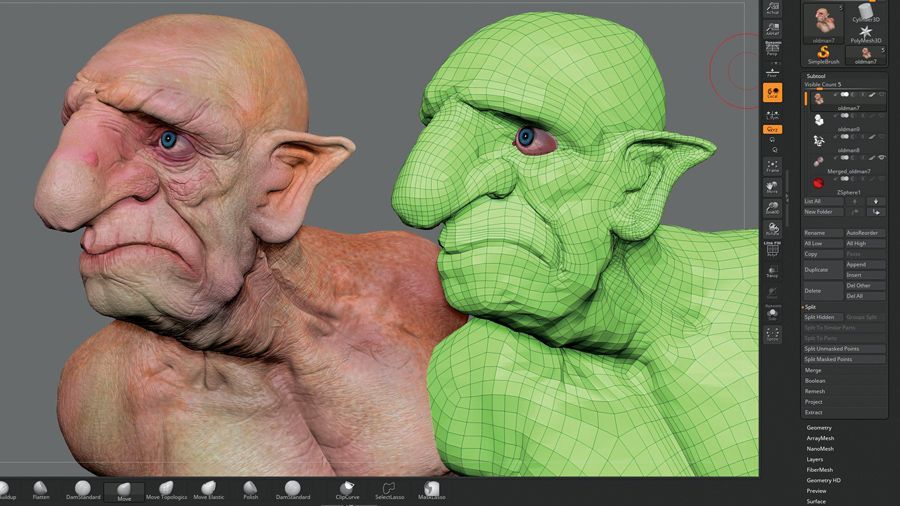
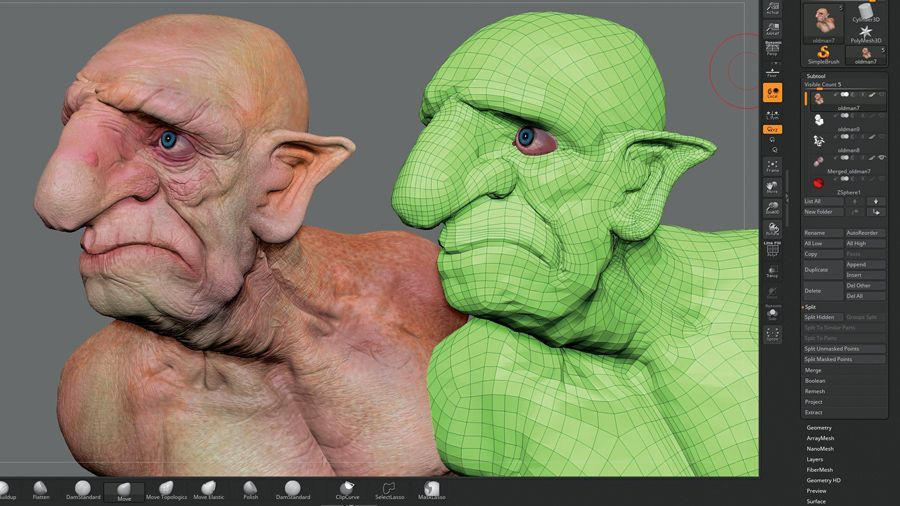
    ZBrush is a powerful 3D digital sculpting and painting software that has revolutionized the world of graphics design and animation. Developed by Pixologic, ZBrush has become a favorite tool for designers, animators, game developers, and artists, thanks to its impressive features and capabilities. In this blog post, we’ll delve deeper into ZBrush, exploring its features, uses, and benefits.

    ZBrush Features

    ZBrush has a wide range of features that make it stand out from other 3D sculpting and painting software in the market. Here are some of its most notable features:

    1. Digital Sculpting: ZBrush allows designers to create highly detailed and complex 3D models and sculptures using a variety of digital sculpting tools. The software uses a proprietary technology called Pixol, which allows users to work with models that have billions of polygons without sacrificing performance.
    2. Dynamic Brushes: With ZBrush, designers can create dynamic and expressive brush strokes, allowing them to sculpt and paint their models with great precision and accuracy.
    3. 3D Texturing: ZBrush allows designers to create stunning and realistic textures for their models. The software comes with a library of pre-made textures, and designers can also create their own custom textures using a range of tools.
    4. UV Master: ZBrush’s UV Master tool makes it easy for designers to unwrap their models for texturing and rendering. The tool automates the UV mapping process, saving designers time and effort.
    5. Polypainting: ZBrush’s Polypainting feature allows designers to paint directly onto their models. The software supports high-resolution textures, allowing designers to create highly detailed and realistic textures for their models.

    What Are The Uses of ZBrush?

    ZBrush is used by designers and artists for a wide range of applications, including:

    1. Film and Animation: ZBrush is widely used in the film and animation industry for creating highly detailed and realistic characters, props, and environments. Its digital sculpting tools and dynamic brushes make it a favorite tool for creating intricate and complex models.
    2. Game Development: ZBrush is also popular in the game development industry for creating 3D models and textures. Its ability to handle high-poly models and its UV Master tool make it ideal for creating high-quality game assets.
    3. Jewelry Design: ZBrush is also used by jewelry designers for creating intricate and detailed 3D models of jewelry pieces. Its digital sculpting tools and dynamic brushes make it easy to create highly detailed and realistic jewelry models.
    4. 3D Printing: ZBrush is also used in the 3D printing industry for creating highly detailed and intricate 3D models. Its ability to handle high-poly models and its precise sculpting tools make it a favorite tool for 3D printing enthusiasts.

    Minimum System Requirements

    The minimum system requirements for ZBrush are as follows:

    • 64-bit editions of Windows or macOS
    • CPU: i5/i7/Xeon processor
    • RAM: 8 GB required for working with high-resolution models
    • HDD: 100 GB of free hard drive space for installation
    • Monitor resolution: 1280×1024 monitor resolution with 32-bit color
    • Video card: Most cards manufactured 2008 or newer. Must support OpenGL 3.3 or higher

    While these are the minimum system requirements, it’s important to note that they are only suitable for basic usage of the software. If you plan on using ZBrush for more demanding projects, you’ll need a more powerful computer system.

    Recommended System Requirements

    The recommended system requirements for ZBrush are as follows:

    • 64-bit editions of Windows or macOS
    • CPU: Intel i7 or AMD equivalent with 4+ cores
    • RAM: 16 GB or more
    • HDD: 100 GB of free hard drive space for installation
    • Monitor resolution: 1920×1080 monitor resolution with 32-bit color
    • Video card: Most cards manufactured 2014 or newer. Must support OpenGL 3.3 or higher.

    The recommended system requirements are suitable for most professional-grade usage of ZBrush. If you plan on working with extremely high-resolution models, you may need an even more powerful computer system.

    What Specs Do I Need To Build The Best Computer For ZBrush?

    Much like graphics design, animation, and video editing, doing 3D work on your PC or gaming laptop requires a lot of power. Now you don’t need a powerful system right off the bat, but your gaming laptop or personal computer needs to be past the minimum system requirements for any software.

    In this case, what kind of hardware power do you need when it comes to guaranteeing ZBrush performance?

    Best CPU for ZBrush

    AMD Ryzen 9 5950X Best Computer for Zbrush

    First we need to make sure that you have a powerful CPU for your ZBrush workstation. You don’t need an Intel Core i9 or an AMD Threadripper, but you do want at least:

    • 12 to 24 cores
    • Great single-thread performance
    • Great multi threaded performance

    Now if we want a multi threaded CPU, then we can work with AMD processors. For single thread performance, we can go for the Intel Core i7 and Intel Core i9 processors. A higher core count AMD processor would immediately guarantee performance for ZBrush or any rendering software.

    Our list of CPUs would be:

    What’s The Best GPU for ZBrush?

    PNY GeForce RTX™ 4080 Best Computer for Zbrush

    A dedicated graphics card is a requirement for running ZBrush or any graphics design, modeling, or animating software. Integrated graphics cards can do the work, but they’re not going to be as powerful as a dedicated graphics card.

    The difference in performance between an integrated graphics card and dedicated graphics card is astronomical. The former is sufficient enough if you just want to browse the Internet or even watch movies. But the latter is required for graphically-intensive tasks and programs.

    You’re probably thinking about getting an integrated GPU because you’ve read about how expensive GPUs are at the moment. Thankfully, pricing has dropped significantly for the hyper-inflated models.

    Having said that, what do you really need from your GPU? You’d probably do well enough with at least 4GB of VRAM (Virtual RAM).

    What do we recommend?

    • High end graphics cards but expensive: Nvidia GeForce RTX 3060/3070/3080, or anything from the RTX 4000-series would be a worthwhile investment.
    • Midrange graphics cards: Nvidia GeForce RTX 2060/2070/2080

    Going for the best RTX 3060 laptops with a dedicated GPU isn’t a bad thing either, as long as you go for the laptops with these aforementioned graphics cards.

    What’s The Best RAM (Memory) for ZBrush?

    Unlike CPUs and GPUs, RAM doesn’t really affect your ZBrush performance greatly. You could do with 8GB of RAM, but you’ll want more if you’re going to be switching between apps and games.

    The sweet spot is at least 16GB, depending on the CPU that you have. An older CPU would struggle with higher RAM capacities, resulting in bottlenecking issues. You’ll also want at least 3600mHz for our RAM modules. Going higher would have diminishing returns, depending on the RAM capacity.

    Corsair Vengeance or G.Skill RipJaws are great brands to keep an eye out for. Both are known for their performance, value, and aesthetics.

    On a personal note, I’ve always used Corsair Vengeance RAM kits. Their kits carry an affordable price tag without sacrificing performance.

    Storage Setup for ZBrush

    Data storage for ZBrush is intensive, which is why you need a pair of storage devices. ZBrush is notoriously known for their large save files and .obj exports, which is why you need something reliable and robust.

    Now, you’ll need a storage space to hold all these files and another storage space for your operating system and applications. Your setup will look like this:

    • NVMe SSD or SATA SSD – Solid state drives are faster than traditional hard drive, so you’ll preload everything on here. Operating systems, video games, and your ZBrush applications go into the SSD. Try to get at least 1TB, or shoot for 2TB capacity.
    • Traditional HDD – This is where you’ll store all of your files, outputs, and renders. You don’t want to store anything on the SSD.

    What’s The Best Motherboard for ZBrush?

    Naturally, you want a motherboard that would be able to house all of the components necessary to guarantee the overall performance of ZBrush or any other software.

    What motherboard you’ll end up using is reliant on what kind of CPU you’ll go for. If you’re going for the high end processors, then you’ll want to go for a high end motherboard.

    Here’s what we would be recommending:

    • AMD Socket AM4: MSI X570 Unify if you want a high-end build or MSI Tomahawk B550 for value
    • Intel Socket LGA-1200: MSI Gaming MAG Tomahawk Z490

    Different PC cases can also determine what kind of motherboard you’re getting.

    What’s The Best Monitor for ZBrush?

    ZBrush doesn’t really require you to have a stunning display, but with all the power underneath your PC, it would be a shame to not be able to see its full potential.

    A high resolution display would be a great choice for ZBrush or any painting program. But don’t expect too much from ZBrush as you’ll only see different shades of grey.

    Screen size wouldn’t be an issue and will not affect the way you work with ZBrush, but just in case, you might want to go for at least 27″ to 32″ to see all the finer details that ZBrush has to offer.

    What If I Want a Laptop For ZBrush?

    Using a laptop for Zbrush is good if you’re on the move a lot, but it doesn’t mean you want something compact. The perfect laptop for ZBrush would have to be any kind of gaming laptop. Laptops that meet system requirements, matches one of our CPU recommendations and GPU recommendations, and more.

    Important factors to consider here will always be the CPU and GPU. RAM and storage space are easily upgradable, but the CPU and GPU aren’t. There are gaming laptops out there with a reasonable price, but we’d be lying if we say that if you really want good performance, you’re going to want to spend more on your ideal PC or laptop.

    The Wrap Up

    In conclusion, ZBrush is a powerful software that requires a robust computer system to run smoothly. By ensuring that your computer meets the minimum or recommended system requirements, and following the tips for optimizing your computer system, you can use ZBrush to create stunning 3D digital sculptures and paintings with ease.

  • What Is The PCIe x16 Slot?

    The PCIe x16 is a motherboard slot with 16 data links. This slot is known to have the highest throughput rate and can be used with different expansion hardware with higher bandwidth requirements such as graphics cards.

    For this article, we’ll go over what the PCIe x16 is, what it can do, and the different PCIe generations.

    The Concept of PCIe x16

    PCIe stands for Peripheral Component Interconnect Express, and is also referred to as PCI Express. PC builders will usually determine what kind of PCIe slot a motherboard has when they’re purchasing graphics cards.

    Most of the modern motherboards released in the market today are customizable. But two interfaces that are considered to be crucial by a lot of the builders in the industry are the SATA and PCIe interface. SATA interfaces are designed for hardware with lower bandwidth requirements such as storage drives. PCIe interface handle the high speed devices.

    Motherboards will come equipped with different sizes of PCIe slots. If this is too much for you, don’t worry. There are only two things that you need to keep an eye out when you’re buying graphics cards: the PCIe slot it uses and the available PCIe slots you have on your motherboard.

    What Does A PCIe x16 Slot Look Like?

    How It Looks Like PCIe x16

    Image: A typical x16 slot.

    A PCie x16 slot can be easily identified by its size on the motherboard chipset. All you have to do is look for the largest slot on there, as seen on the image aboev.

    A PCIe x16 slot measures at about 89mm in length and contains 82 pins, with each pin serving a unique purpose. On the opposite side of the spectrum, we have the PCIe x1 slot and is the smallest sized PCIe slot in the motherboard. It only measures 25mm in length and has 18 pins.

    The PCIe x16 is the largest slot found on a motherboard.

    A proper x16 slot with 16 lanes measures 89 mm in length and has 82 pins, each serving a purpose, such as providing power and transferring data.

    In contrast, the most undersized slot, PCIe x1, has 18 pins and measures 25mm in length.

    What Is The PCIe x16 Slot Used For?

    As mentioned earlier, your graphics cards are installed into the PCIe x16 slots, primarily because graphics cards transmit the most amount of data. It goes without saying that the GPU goes into the slot that can accommodate higher bandwidth.

    What Does The 16 Stand For After The X?

    The X denotes the number of PCIe lanes a PCIe slot has. For example, a PCIe x1 contains 1 PCIe lane and a PCIe x4 contains four lanes and so on.

    However, a PCIe x16 doesn’t necessarily mean it contains 16 lanes, and we’ll get to that in the next section.

    You also have to remember that there’s a difference between x16 and True x16 slot. A slot with a physical size of an x16 slot may only contain 4 or 8 lanes. As the name implies, a True x16 slot contains 16 lanes and is found in modern motherboards. A PCIe x16 slot that doesn’t contain 16 lanes are used for smaller pieces of hardware like an NVMe SSD expansion card or storage drive. Your graphics cards are installed on the True x16 slot.

    What Are The Different Types of PCIe Slots?

    Different PCIe Slots PCIe x16

    In order for us to understand the functions of a PCIe x16 slot, we’ll need to understand the different types of PCIe slots and what they’re commonly used for.

    PCIe x1 Slot

    We mentioned prior that the PCie x1 slot is the smallest PCIe slot on a motherboard chipset, while the x16 slot is the largest. The PCIe x1 slot is used for modems, sound cards, and other port expansion cards.

    PCIe X4 Slot

    Up next we have the PCie x4 slot. This slot contains 4 PCIe lanes and is used for some higher bandwidth hardware like 10G Network Cards and NVMe SSD expansion cards.

    PCIe X8 Slot

    The PCIe x8 slot contains 8 PCIe lanes and is used for secondary graphics cards. Builders often look for motherboards that have a PCIe x8 slot so they can use two graphics cards. The x8 slot is also used for RAID controllers or RAID cards.

    What Are The Current PCIe Generations?

    A PCI express standard will come in five generations: PCIe 1.0, PCIe 2.0, PCIe 3.0, PCIe 4.0, and PCIe 5.0. Newer generation has double the bandwidth compared to the previous ones.

    What’s New With PCIe 4.0?

    The PCIe 4.0 standard was introduced in 2017 and has 64GBPs throughput. This particular PCI express standard generation is used primarily by enterprise-grade servers. But in 2019, they were able to accommodate SSDs. That same year, the AMD Ryzen 3000-series processors were the first desktop CPUs to support PCIe 4.0 x16, provided their users ran with an X570 motherboard chipset.

    What’s New With PCIe 5.0?

    Two years after the PCie 4.0 was introduced, the PCIe 5.0 debuted into the market. The new PCI express standard generation came with 128GBps fo throughput and backward compatibility with previous generations.

    PCIe 5.0 also contains features such as improved electrical workings that allow for backward-compatible CEM connectors. This time, Intel was the first to accommodate the PCIe 5.0 out of the box with its Alder Lake architecture.

    Are There Future PCIe Generations?

    PCIe 6.0

    PCI-SIG released the standards for the PCIe 6.0 in 2021, but we won’t be expecting to see any products working with PCIe 6.0 until late 2022 or early 2023.

    PCIe 6.0 will have about 256GBPs of throughput, double that of the PCIe 5.0. It’s also mentioned that the data transfer rate will reach 64 GT/s per pin, double that of the PCIe 5.0’s 32 GT/s per pin. And yes, PCIe 6.0 will be backwards compatible

  • 15+ Impressive Among Us Statistics That Are Not Sus At All (Jul 2026)

    15+ Impressive Among Us Statistics That Are Not Sus At All (Jul 2026)

    Among Us is a popular online multiplayer game that has taken the gaming world by storm. Developed by the small indie game studio InnerSloth, it was released in 2018 but only gained widespread popularity in 2020, when it became a viral sensation among players all over the world. In this blog post, we’ll explore the history of Among Us and why it has become such a cultural phenomenon.

    Who Developed Among Us?

    Say Hello To the Crew Among Us Statistics

    InnerSloth was founded in 2015 by Marcus Bromander and Forest Willard, two programmers who had a passion for creating fun and engaging games. They started out by developing mobile games, but eventually turned their attention to PC games. Their first game, a space-themed strategy game called The Henry Stickmin Collection, was moderately successful. However, it was their second game, Among Us, that truly put them on the map.

    The concept for Among Us was inspired by party games like Mafia and Werewolf, in which players must deduce who among them is the traitor or the killer. In Among Us, players take on the roles of astronauts aboard a spaceship, one or more of whom are impostors trying to kill the crew and sabotage the ship. The rest of the crew must complete tasks and work together to identify and vote off the impostors before it’s too late.

    Key Among Us Statistics

    • In January 2022, Among Us peaked at 217.2 million concurrent players and averaged 163.6 million players a month for that year as well [1].
    • There are more than 10 million players logged in to the mobile game daily [1].
    • Sodapoppin was the reason why Among Us was an instant game hit when he streamed it on Twitch to his 2.8 million followers in 2020. For that period, he had more than 47,000 views for his Among Us gameplay [4].
    • Among Us earned $86 million in revenue for 2021, almost four times the revenue earned in 2020 ($24.5 million) [6].
    • The PC platform accounts for more than 60% of the game’s total earnings [6],[9]. It’s worth mentioning that PC players only account for 3% of the entire player base of the best mobile game/party game.
    • Twitch Rivals Friday Night Bites Ft KAT and Among Us hosted a tournament with the biggest tournament prize pool amounting to $30,000 [5].
    • Congresswoman Alexandria Ocasio-Cortez streamed her Among Us game on Twitch. Together with Sykunno, Pokimane, and other bigtime streamers, that AOC stream generated more than 439,000 views over the span of three hours [5].
    • Among Us statistics for Twitch shows that the game is viewed by an average of 2,000 people daily [2],[14].
    • The peak viewer count for Among Us on Twitch was 770,000 viewers in November 2020 [2].

    Among Us Player Statistics

    • In 2022, Among Us peaked at 217.2 million players for the month of January. Average monthly player count for 2022 was at 163.6 million [1].
    • 10 to 15 million active players are logged in on a daily basis [1].
    • The average age of players is between 14 and 30 years old. Players aged 20 to 30 years old dominate the player count for Among Us [1], [12].
    • Among Us was downloaded more than 100 million times on different consoles. The mobile version had more than 320 million downloads and was considered to be the most downloaded app in October 2020. Other platforms such as PC and Nintendo Switch have not released download data for the game [6].

    With the current player count and average monthly active players, it’s safe to say that Among Us isn’t a dead game. Rather people play this game for the fun of it. With the release of new roles, there are more people playing Among Us and trying out these new roles for themselves.

    Among Us Popularity Statistics

    AOC On Stream with Among Us Among Us Statistics
    • In 2022, Among Us peaked at 70 million hours on stream, and is ranked #86 as the most-watched games on Twitch [2].
    • Peak viewer count for Among Us on Twitch hit reached more than 770,000 viewers in November 2020 [2].
    • Twitch draws in more than 2,000 average viewers for Among Us [2],[14].
    • Streamer Sodapoppin was the reason why Among Us became a big hit on Twitch. He streamed the game in 2020 to his 2.8 million followers (at that time) and had more than 47,000 views for his Among Us streams [4].
    • Congresswoman Alexandria Ocasio-Cortez streamed on Twitch playing Among Us with Valkyrae, Pokimane, Sykkuno, and other big time streamers. AOC’s stream generated more than 439,000 views, making it the third most watched stream for that time period [5].
    • As of this writing, there are more than 87 peak channels (live) still streaming Among Us on a daily basis and averaging about 30.8 viewers per channel [2].

    Among Us Revenue Statistics

    Now that we know what makes this game popular and the average number of concurrent players and new users on a daily basis, but do the quick stats above prove that the game is profitable?

    Among Us will cost you $5 to purchase on Steam and Nintendo Switch, while it’s free to download for mobile games. Now you know why there are more people playing on the mobile phone than any other platform.

    Then there are also in-game purchases or in app purchases in Among Us, so the average player count and live player count can contribute to the game’s earning potential.

    But let’s look at the exact numbers on how much money they made.

    • In 2021, Among Us’s revenue was $86 million, which was almost a 300% increase from 2020’s $24.5 million in revenue [6].
    • PC platform accounts for more than 64% of Among Us’s total earnings [6], [9]. Surprisingly, the active players on PC only account for 3% of the total number of players in the game[6], [9].
    • USA has the highest number of player count in Among Us, accounting for 36% of all players globally. United Kingdom and India follow in 2nd and 3rd place with 5.11% and 4.67% respectively [8].

    Among Us eSports

    Players play in the professional scene when it comes to Among Us. It’s a given because it’s one of the most popular games of all time.

    This section will cover just how the best multiplayer game in the party category made with their esports venture.

    • Twitch Rivals Friday Night Bites Ft KAT and Among Us hosted the tournament with the biggest prize pool amounting to $30,000 [10], [11]!
    • Faze Clan’s in-house In-Vent-Ational Tournament comes in second place with $25,000 in prizes [10], [11].
    • Tyler Niknam is the #1 highest earning player with $25,000 in tournament winnings, followed by Canadian Autumn with $6,000 and SlikeR with $1,000 [11].
    • More than 23 Among Us tournaments have been organized around the world [11].

    Why Is Among Us So Good?

    What makes Among Us so compelling is its simplicity and accessibility. It’s easy to learn and doesn’t require a lot of hardware or technical expertise to play. Players can join games with friends or strangers, and the game can be played on a variety of platforms, including PC, mobile devices, and Nintendo Switch. The game is also free to play on mobile devices, which has made it especially popular among younger players.

    However, what truly sets Among Us apart is its social element. The game encourages players to communicate and work together, which can lead to hilarious moments and unexpected alliances. Players must use their wits and observation skills to deduce who the impostors are and convince others to vote them off. It’s a game that rewards both strategy and social skills, which makes it a hit among players of all ages.

    But why has Among Us become such a cultural phenomenon? Part of it has to do with its timing. The game gained popularity during the COVID-19 pandemic, when people were looking for ways to connect with others and have fun while staying at home. The game’s accessibility and social element made it a perfect way to pass the time with friends and family.

    Another reason for its popularity is its impact on popular culture. Among Us has become a meme, with players creating fan art, memes, and videos that have spread across social media platforms. The game has even been referenced in popular TV shows and movies, cementing its place in the zeitgeist.

    The Wrap Up

    In conclusion, Among Us is a game that has captured the hearts and minds of players all over the world. Its simple yet engaging gameplay, accessibility, and social element have made it a cultural phenomenon. InnerSloth’s creation has proven that even a small indie game studio can create a hit game that captures the imaginations of players everywhere.

    Reference

    [1]https://activeplayer.io/among-us/

    [2] https://twitchtracker.com/games/510218

    [3] https://levvvel.com/among-us-statistics-and-facts/

    [4] https://cometoplay.co.uk/interesting-facts/among-us-statistics-facts/

    [5] https://www.cnet.com/news/politics/aoc-plays-among-us-on-twitch-gets-one-of-the-most-watched-streams-ever/

    [6] https://www.pocketgamer.biz/news/76710/among-us-has-generated-86-million-on-mobile-in-nearly-three-years/

    [7] https://www.businessofapps.com/data/among-us-statistics/

    [8] https://playercounter.com/among-us/

    [9] https://www.sportskeeda.com/among-us/news-just-3-among-us-players-play-pc

    [10] https://escharts.com/tournaments/among-us/twitch-rivals-friday-night-bites-ft-karl-anthony-towns-among-us

    [11] https://www.esportsearnings.com/games/702-among-us

    [12] https://www.reddit.com/r/AmongUs/comments/jjd7hd/age_of_players

    [13] https://steamcharts.com/app/945360

  • What’s The Best Macbook Air Alternative In The Market? (Jul 2026)

    The MacBook Air is a line of laptops developed by Apple Inc. The first MacBook Air was released in January 2008, and since then, it has gone through multiple updates and redesigns. The MacBook Air is a popular choice for people who want a portable and powerful laptop that can handle everyday tasks with ease.

    Why Do People Even Like The Macbook Air?

    Design

    The MacBook Air has a sleek design and is incredibly thin and light. The current model, released in 2020, is just 0.63 inches (1.61 cm) thick and weighs only 2.8 pounds (1.29 kg). The laptop is made of aluminum, which gives it a premium feel and makes it durable. The MacBook Air comes in three different colors: gold, silver, and space gray.

    Display

    The MacBook Air has a 13.3-inch Retina display, which means it has a high pixel density and can display clear and sharp images. The display also supports True Tone technology, which adjusts the color temperature based on the ambient light in the room. This makes the display more comfortable to look at and reduces eye strain.

    Performance

    The MacBook Air is powered by Apple’s M1 chip, which is a powerful and efficient processor designed specifically for Macs. The M1 chip has eight cores, including four high-performance cores and four high-efficiency cores. This allows the MacBook Air to handle demanding tasks like video editing and running multiple apps at the same time.

    Battery Life

    The MacBook Air has a long battery life and can last up to 15 hours on a single charge. This means you can use the laptop throughout the day without having to worry about running out of battery.

    Keyboard and Trackpad

    The MacBook Air features Apple’s latest keyboard design, which uses a scissor mechanism for more precise and comfortable typing. The keyboard is also backlit, which makes it easier to type in low light conditions. The trackpad is large and responsive and supports multi-touch gestures, making it easy to navigate the operating system and apps.

    Ports

    The MacBook Air has two Thunderbolt/USB 4 ports, which support fast data transfer and can be used to connect external displays, storage devices, and other peripherals. The laptop also has a headphone jack, which is a feature that many newer laptops are starting to omit.

    Are There Windows Laptops Better Than The Macbook Air?

    While the MacBook Air is a fantastic laptop, there are other laptops on the market that may be better suited for your needs. Here are some tips on how to use laptops better than the MacBook Air.

    Gaming Laptops

    If you are an avid gamer, then a gaming laptop may be a better choice for you than the MacBook Air. Gaming laptops are designed with high-end graphics cards and powerful processors that can handle even the most demanding games. They also have features like high refresh rate displays and RGB lighting that can enhance your gaming experience.

    Workstation Laptops

    If you are a professional who needs a laptop that can handle complex tasks like video editing, 3D modeling, and rendering, then a workstation laptop may be a better choice for you than the MacBook Air. Workstation laptops are designed with powerful processors, dedicated graphics cards, and large amounts of RAM that can handle these tasks with ease. They also have features like high-resolution displays and color accuracy that are important for professionals.

    2-in-1 Laptops

    If you need a laptop that can also function as a tablet, then a 2-in-1 laptop may be a better choice for you than the MacBook Air. 2-in-1 laptops have screens that can be flipped or detached from the keyboard, allowing them to be used as tablets. They are ideal for tasks like note-taking, drawing, and presentations.

    Budget Laptops

    If you are on a tight budget, then a budget laptop may be a better choice for you than the MacBook Air. Budget laptops are designed to be affordable, but they still offer decent performance and features. They are ideal for tasks like web browsing, word processing, and watching videos.

    Windows Laptops

    If you prefer the Windows operating system over macOS, then a Windows laptop may be a better choice for you than the MacBook Air. Windows laptops offer a wider variety of hardware options, and they are often more affordable than Macs. They also offer compatibility with a wider range of software and peripherals.

    What’s The Best Macbook Air Alternative?

    Apple Macbook Air has set the bar for premium laptops, or those that are priced at $1,000 or higher. Macbook Air was also in itself an alternative to Macbook Pros, which were more expensive than the Air.

    However, most of the newer laptops released over the last two or three years within the same price range as an Apple Macbook Air are competing right alongside the Macbook Air. Sometimes, they might even have an edge over the Macbook Air.

    This list features the best Macbook Air Alternatives that have better specs and features than the Macbook Air itself. This list of Macbook alternatives isn’t arranged in any particular order.

    LG Gram 16

    As Powerful As The Macbook Pro Minus The Weight

    LG Gram 16Z90P Macbook Air Alternative

    First on this list of Macbook alternatives is the LG Gram 16, and it’s one of the strongest contenders here. It competes evenly against the Macbook Pro, but without being as heavy as the Pro.

    The LG Gram 16 features a thin and light design with a lot of power underneath. You’re getting at least an Intel Core i7 processor, at least 16GB of RAM, and Intel Iris XE integrated graphics card.

    You may not be able to play games on this beast, but it does a hell of a good job with office work, browsing, and some graphic design even.

    Razer Book 13 (2021)

    If Macbook Air Had Ports

    Razer Book 13 Laptop Macbook Air Alternative

    Without a doubt, Razer has established itself as one of the most dominant and most popular brands of laptop in the industry right now. And while they primarily focus on gaming, their foray into the office productivity sector has not gone unnoticed. And for their entry into this list, we could’ve easily picked any of the Razer Blade laptops. But we digressed and went for their premium notebook called the Razer Book.

    And given the size of the Razer Book, you’re not going to find a discrete graphics card installed on here. The Razer Book features an Intel Core i7 processor, Intel Iris XE integrated graphics card, 16GB of RAM, and 256GB of SSD storage.

    The Razer Book comes with with a 13″4 touch display surrounded by thin bezels and a lightweight chassis that makes it the best mobile companion in the market.

    Lenovo Yoga 9i

    The Best 2-in-1 Laptop In The Market

    Lenovo Yoga 9i 14 Macbook Air Alternative

    When we’re talking about Macbook Air alternatives, we would’ve been hesitant to include the Yoga 9i series of laptops from Lenovo given their previous iterations’ lackluster performance. But the current generation of Yoga 9i has changed our minds, and it’s probably the best Macbook Air alternative under the 2-in-1 laptop bracket.

    Under the hood, we get an Intel Core i7 processor and Intel XE graphics card, 512 SSD storage, and 16GB of RAM. The Lenovo Yoga 9i also features a 14″ UHD touch screen monitor, and a whole lot of ports. Did we mention that it also has an impressive battery life of at least 10 hours (average)?

    You might equate the Lenovo Yoga 9i to the Microsoft Surface Laptop series, also a strong contender in the 2-in-1 laptop market. But the Lenovo Yoga 9i is relatively more affordable than the Surface Laptop, which also makes it a decent alternative.

    Alienware x14 R1

    A Powerful Macbook Air Alternative For Gamers

    Alienware X14 R1 Macbook Air Alternative

    To have any gaming laptop on here on this list of the best Macbook Air alternatives would be cheating, but you might want to hear us out first.

    It goes without saying that gaming laptops, regardless of brand, are automatically better Macbook Air alternatives primarily for their specifications. However, their mobility doesn’t give them an edge over the Macbook Air due to the poor battery life and large size.

    But…

    With the advent of 14-inch gaming laptops, people are now getting power and portability in one nifty gadget. And on this list of the best Macbook Air alternatives under the gaming laptop category, we have the Dell Alienware x14 R1.

    Much like the Razer Blade series of laptops, Alienware is also one of the most recognizable brands of gaming laptops in the industry. They were known for not holding out on sheer size and power, and they made it clear that their users were not willing to compromise power for size. While they dominate the 15-inch and 17-inch gaming laptop market, they’re also trying to fight their way towards the 14-inch market dominated by the likes of the HP Spectre series, HP Envy series, and even Razer.

    The Dell Alienware x14 R1 features a powerful 12th generation Intel Core i7 processor, at least 16GB of RAM (upgradable), an Nvidia GeForce RTX 3060 graphics card, and 1TB SSD. Like we said, Dell Alienware does not hold out on power even under such a small and lightweight chassis. It also has a decent battery life for a gaming laptop, meaning you can spend a couple of hours gaming without being plugged in. But then again, you don’t want to game just running on the battery.

    Apple’s Macbook Air might have a difficult time keeping up with the likes of the Dell Alienware X14 R1. It’s just one of the best Macbook alternatives out there under the 14-inch gaming laptop category.

    Samsung Galaxy Book2 Pro 360 

    Ultra Thin But Ultra Powerful

    Samsung Galaxy Book2 Pro 360  Macbook Air Alternative

    If you want something thinner than the Macbook Air, the Thinkpad X1 Nano, or the Dell XPS 13, then consider the Samsung Galaxy Book2 Pro 360.

    And yes, this is considered by a lot of people as the best Windows laptop that’s just as portable as the Macbook Air M2 or other Macbook Air variants for that matter. Just because it’s thin doesn’t mean it lacks in power too.

    Under the hood, you get Intel Core i7 processor, 16GB of RAM, 256GB SSD storage, and Intel Iris XE integrated graphics. The Samsung Galaxy Book2 Pro 360 also features a 360-degree hinge that lets you turn this laptop into a tablet.

    The Wrap Up

    In conclusion, while the MacBook Air is an excellent laptop, it’s not necessarily the right choice for everyone. There are many great alternatives on the market that may be better suited for your needs, such as gaming laptops, workstation laptops, 2-in-1 laptops, budget laptops, and Windows laptops.

    When choosing a laptop, it’s important to consider your specific needs and budget. Think about what tasks you will be using the laptop for and what features are most important to you. Do your research, read reviews, and compare specs to find the best option for you.

    Remember, the perfect laptop is one that meets your needs and fits within your budget. Don’t feel pressured to choose a certain brand or model just because it’s popular or trendy. With a little research and some careful consideration, you can find the perfect laptop for your needs, whether it’s the MacBook Air or one of the best Macbook Air alternatives on the list above.

  • How Hot Is Too Hot For GPU?

    How Hot Is Too Hot For GPU?

    Graphics cards, also known as GPUs (Graphics Processing Units), are an essential component of modern computers. They are graphics processing unit responsible for rendering and displaying images, videos, and other graphical content on your computer screen.

    In this blog post, we’ll discuss why graphics cards are important and how they impact your computer’s performance.

    Why Are Graphics Cards Considered Important Components?

    RTX 4080 How Hot Is Too Hot For GPU

    Improved Gaming Performance

    Graphics cards are important because they can greatly improve gaming performance. A powerful graphics processing unit can render game environments and characters with more detail and higher frame rates, resulting in a smoother and more immersive gaming experience. Many modern games require a dedicated graphics card to run at their highest settings, and without one, you may experience lag, stuttering, and other performance issues.

    Better Video and Photo Editing

    Graphics cards can also improve the performance of video and photo editing software. These applications often require complex calculations and processing of large amounts of data, which can be accelerated by the specialized processing units in a graphics card. With a powerful graphics card, you can render and edit high-resolution video and images more quickly and efficiently, saving you time and improving your productivity.

    More Accurate Scientific Simulations

    In addition to gaming and multimedia applications, graphics cards can also be used for scientific simulations and calculations. Many scientific applications, such as weather forecasting, climate modeling, and molecular dynamics simulations, require large amounts of computational power, which can be provided by GPUs. Graphics cards can perform these calculations much more quickly and accurately than traditional CPUs, allowing researchers to run more complex simulations and make more accurate predictions.

    Virtual and Augmented Reality

    Finally, graphics cards are also essential for virtual and augmented reality applications. These technologies require high-resolution displays and fast refresh rates, which can only be achieved with powerful graphics cards. With a VR-ready graphics card, you can experience immersive virtual environments and interact with digital objects in a more natural and intuitive way.

    How Hot Is Too Hot For GPU Temperature?

    GPU On Motherboard How Hot Is Too Hot For GPU

    As a rule of thumb, a GPU temperature under heavy load should typically stay below 85-90 degrees Celsius (185-194 degrees Fahrenheit). However, the specific temperature limit for a graphics processing unit can vary depending on the manufacturer and model.

    In general, most modern GPUs are designed to operate safely at temperatures up to 90 degrees Celsius, but running a GPU at that temperature for prolonged periods can increase the risk of damage to the components and decrease the lifespan of the GPU. Therefore, it is recommended to keep the temperature of your GPU below 85 degrees Celsius for optimal performance and longevity.

    To help keep your GPU temperature in check, you can make sure that your computer case has adequate ventilation and cooling, and consider installing additional cooling solutions such as GPU fans or liquid cooling systems. Additionally, you can adjust the fan speed and clock speeds of your GPU using software tools provided by the manufacturer to keep the temperature within safe limits.

    Why Is Overheating Dangerous For your Graphics Card?

    Blue Screen of Death How Hot Is Too Hot For GPU

    Overheating can cause several dangers to a graphics card, including:

    Reduced Performance

    When a graphics card gets too hot, it can start to throttle its performance to prevent damage to the components. This can lead to decreased frame rates, stuttering, and other performance issues. This reduced performance is only temporary. Once average GPU temperatures are reached, then performance should return to normal.

    Component Failure

    A higher than normal GPU temp can result in overheating. When this happens, your GPU’s temperature is abnormally high and your cooling systems can’t cool it down fast enough. Overheating can cause damage to the components on the graphics card, including the GPU, memory chips, and VRMs. This can result in system crashes, artifacts, and other problems. In extreme cases, overheating can cause permanent damage to the graphics card, rendering it unusable. You can make use of system monitoring software to keep track of your GPU temperature during usage and when idling.

    Reduced Lifespan

    Overheating can also reduce the lifespan of a graphics card. Heat can cause the components to degrade over time, leading to premature failure and reduced performance.

    Fire Hazard

    In rare cases, extreme overheating can pose a fire hazard, particularly if there are flammable materials in the vicinity. We’ve seen images on the Internet showing either GPUs or CPUs being on fire. While graphics cards reach high temperatures, it’s not enough to set nearby components on fire. If anything, the generated heat will probably just affect the other components negatively, but nothing too damaging as catching fire.

    What Are Tips To Maintain Average GPU Temperature?

    Graphics cards are an essential component for modern gaming, video editing, and other graphics-intensive tasks. However, these powerful devices can generate a lot of heat, which can lead to performance issues, component failure, and reduced lifespan. In this blog post, we’ll discuss some tips on how to keep your graphics card cool.

    Proper Ventilation and Airflow

    The first and most important step in keeping your graphics card cool is to ensure that your computer case has adequate ventilation and airflow. Make sure that there is enough space around your graphics card for air to circulate, and that the case has enough fans to move hot air out of the case. If your computer case is particularly small or cramped, you may need to consider upgrading to a larger case with better ventilation.

    Your room’s ventilation and airflow also matter. We’re not exactly recommending open air cooling here, but at least the ambient room temperature should be cool enough to keep your system cool. A lower ambient temperature should help keep your system cool.

    Regular Cleaning

    Dust and debris can accumulate inside your computer case over time, clogging up fans and air filters and reducing the effectiveness of your cooling system. A dirty GPU fan could be a cause of an abnormally high GPU temperature.

    Regularly cleaning your computer case with compressed air or a vacuum cleaner can help keep your graphics card and other components cool.

    Adjusting Fan Speeds

    Most graphics cards come with their own built-in fans, which can be controlled using software tools provided by the manufacturer. Increasing the speed of your graphics card fan can help dissipate heat more effectively, but be aware that higher fan speeds can also lead to increased noise levels.

    Fan speeds matter here because the heat transfer from the aluminum heatsink is affected. When heat is absorbed by the heatsink, the GPU fans need to be able to draw out the heat as fast as it can. This is a quick and neverending cycle that keeps your graphics cards cool. But the fan speeds of GPU varies depending on the manufacturer.

    Overclocking carefully

    Overclocking your graphics card can help improve performance, but it can also generate more heat. If you’re going to overclock your graphics card, make sure to do it carefully and incrementally, and monitor the temperature and performance of your GPU closely.

    Upgrading cooling solutions

    If your graphics card is consistently running hot, you may need to consider upgrading your cooling solutions. Aftermarket cooling solutions such as liquid coolers or high-performance fans can help keep your graphics card cool, but they can also be more expensive and difficult to install than stock cooling solutions.

    What Software Should I Use To Maintain Optimal GPU Temperature?

    There are several software tools that you can use to monitor and control the temperature of your graphics card:

    MSI Afterburner

    This is a popular tool that allows you to adjust the clock speeds, fan speeds, and voltage of your graphics card, as well as monitor the temperature, usage, and performance of your GPU.

    EVGA Precision X1

    This is a similar tool to MSI Afterburner, offering features such as GPU overclocking, fan control, and temperature monitoring. Some Nvidia users prefer using this system monitoring software over the MSI Afterburner.

    GPU-Z

    This is a lightweight tool that provides detailed information about your graphics card, including the temperature, clock speeds, memory usage, and other PC components.

    HWMonitor

    This is a system monitoring tool that allows you to check the temperature of your CPU, GPU, and other components, as well as the usage and performance of your system.

    SpeedFan

    This is another system monitoring tool that allows you to control the speed of your fans, which can help keep your graphics card cool.

    The Wrap Up

    It’s quite normal for GPUs to reach a high temperature when they’re in use. Tasks such as video rendering, 3D work, and even gaming can cause GPUs to reach high temperatures, but within a tolerable range.

    But what’s not okay here is when the GPU temperature goes abnormally high for no reason, or when the GPU temperature is not cooling down fast enough.

    Most GPU manufacturers have established tolerable heat thresholds for all of their graphics cards. Both Nvidia and AMD GPUs can go as high as 90 to 100 degrees Celsius, which is normal all things considered. Anything higher than that could cause problems in the long run.

  • How Do You Build the Most Powerful PC for 3DS Max?

    How Do You Build the Most Powerful PC for 3DS Max?

    3D animation and modeling requires a powerful workstation PC. There’s no denying that. Powering through the animation workload is one thing, and rendering performance is another. CPU rendering and GPU rendering are commonly used by most animation software, but the latter isn’t as heavily used. Because CPU rendering is the most reliable way to process animation workloads, you’ll need a CPU with the highest possible clock speed that you can get your hands on. Higher clock speeds mean faster rendering and better workload management.

    In this article, we’ll go over what it takes to build the best computer possible for 3DS Max or any other 3D animation/modeling software.

    What Is 3DS Max?

    Animating a Cloud Most Powerful PC for 3DS Max

    As a 3D animator, one of the most popular software tools in the industry is 3DS Max. This software is widely used in the film, game development, and architectural industries. The fact that professionals are using Autodesk 3DS Max heavily means that the software requires the best performance possible from a single workstation.

    What Advantages Does Autodesk 3DS Max Have To Offer?

    Comprehensive Toolset

    3DS Max offers a comprehensive toolset that includes modeling, texturing, animation support, and rendering tools, making it an all-in-one solution for 3D artists.

    Customizability

    3DS Max allows for extensive customization, with its open architecture and flexible scripting language, making it an excellent tool for creating complex animations and workflows.

    Wide Industry Usage

    3DS Max is widely used in the film, game development, and architectural industries, meaning that there is a large community of users who share tips, tutorials, and assets.

    Integration with Other Software

    3DS Max integrates seamlessly with other software tools, including Adobe Photoshop, After Effects, and Autodesk Maya, allowing for a more streamlined workflow.

    What Are The System Requirements for Autodesk 3DS Max?

    1. Operating System: Windows 10 (64-bit) or higher.
    2. Processor: Intel or AMD multi-core processor, 3 GHz or higher.
    3. Memory: 8 GB RAM (16 GB recommended).
    4. Graphics Card: DirectX 11 compatible graphics card (NVIDIA or AMD) with 4 GB VRAM or higher.
    5. Hard Drive: 9 GB free disk space.

    What Goes Into Building The Most Powerful PC for Autodesk 3DS Max?

    PC with a Cougar Case Most Powerful PC for 3DS Max

    Building a powerful gaming and 3D animation computer requires a careful balance of hardware components that can handle the intense processing requirements of both tasks. In this blog post, we will discuss the pros and cons of building a powerful gaming and 3D animation computer and the hardware components required to build one.

    Pros of Building a New Workstation

    High Performance

    Building a powerful computer for gaming and 3D animation ensures that you have a high-performance machine that can handle even the most demanding tasks.

    Customization

    Building your computer allows you to choose each component carefully and customize your machine to suit your specific needs.

    Cost-Effective

    Building your computer can be more cost-effective than purchasing a pre-built machine with similar features and specifications.

    Future-Proofing

    Building a powerful computer allows you to future-proof your machine and upgrade components as necessary to keep up with advancing technology.

    Cons of Building a New Workstation

    Technical Knowledge

    Building a powerful computer requires technical knowledge, and mistakes can result in damage to hardware components.

    Time-Consuming

    Building a powerful computer can be time-consuming, as you need to research and select each component carefully. Then there are issues of stock availability as well. most users would probably just

    Compatibility Issues

    Selecting the wrong hardware components can result in compatibility issues that affect the overall performance of your machine.

    Hardware Components Required for a Powerful Gaming and 3D Animation Computer:

    1. CPU: The central processing unit is the brain of your computer and should be a high-performance model from Intel or AMD.
    2. GPU: The graphics processing unit is critical for gaming and 3D animation and should be a dedicated model from NVIDIA or AMD.
    3. RAM: A high amount of RAM is essential for gaming and 3D animation and should be at least 16GB, with 32GB recommended.
    4. Storage: A solid-state drive (SSD) is recommended for fast boot and load times, and a high-capacity hard drive should be included for storage.
    5. Cooling: A high-quality cooling system is necessary to prevent overheating and prolong the life of your hardware components.

    What Does The Most Powerful PC For 3DS Max Look Like?

    Building a powerful PC is an exciting and rewarding process that can provide you with a high-performance machine capable of handling the most demanding tasks. In this blog post, we will discuss the hardware specifications required to build a powerful PC.

    Central Processing Unit (CPU)

    Intel Core i9-11900K Most Powerful PC for 3DS Max

    The CPU is the brain of your computer, and its performance determines how fast your computer can perform tasks. The Intel Core i9-11900K and AMD Ryzen 9 5950X are currently two of the most powerful CPUs on the market. The Intel Core i9-11900K has a base clock speed of 3.5 GHz and can turbo boost up to 5.3 GHz, while the AMD Ryzen 9 5950X has a base clock speed of 3.4 GHz and can turbo boost up to 4.9 GHz. Both CPUs have multiple CPU cores, making them ideal for multi-threaded applications and CPU rendering.

    AMD Ryzen 9 5950X Most Powerful PC for 3DS Max

    Consider the following specifications:

    • A minimum CPU core count of four cores and eight threads for multi-tasking
    • A clock speed of 3.5 GHz or higher for fast processing
    • Intel Core i7 or i9 or AMD Ryzen 7 or 9 for high-performance

    Graphics Processing Unit (GPU)

    MSI Gaming GeForce RTX 3080 Most Powerful PC for 3DS Max

    The GPU is responsible for rendering images and video, and its performance is critical for gaming, video editing, and 3D rendering. NVIDIA GeForce RTX 3080 and AMD’s Radeon RX 6900 XT are two of the most powerful GPUs available. The GeForce RTX 3080 has 8704 CUDA cores and 10 GB of GDDR6X memory, while the Radeon RX 6900 XT has 5120 Stream Processors and 16 GB of GDDR6 memory.

    Consider the following specifications:

    • A dedicated graphics card with at least 4GB of VRAM for gaming and GPU rendering
    • NVIDIA GeForce RTX or AMD Radeon RX are powerful GPU series from Nvidia and AMD respectively. Consider those brands. If you want more power, consider something from the RTX 3000-series or the Radeon 6000-series.
    • A high number of CUDA cores for faster processing
    • Ray tracing and DLSS for improved graphics quality
    • If your motherboard can handle multiple cards, go for the same graphics cards.

    System RAM

    Corsair Vengeance LPX 32GB (2x16GB) Most Powerful PC for 3DS Max

    RAM is responsible for temporarily storing data and instructions that your computer needs to access quickly. A minimum of 16 GB of RAM is recommended for a powerful PC, with 32 GB or more recommended for demanding tasks like video editing and 3D rendering. Corsair Vengeance LPX and G.SKILL Ripjaws V are popular choices for high-performance RAM.

    Consider the following specifications:

    • A minimum of 16GB of RAM for gaming and video editing
    • 32GB or more for 3D rendering and other memory-intensive tasks
    • DDR4 with a clock speed of 3200 MHz or higher for fast processing

    Storage

    Samsung 970 EVO Plus Most Powerful PC for 3DS Max

    There are two types of storage devices to consider when building a powerful PC: solid-state drives (SSD) and hard disk drives (HDD). SSDs are faster and more expensive, while HDDs are slower and more affordable. A combination of both is recommended for a powerful PC, with an SSD for the operating system and frequently used applications, and an HDD for data storage. The Samsung 970 EVO Plus and Western Digital Black are popular choices for high-performance SSDs, while the Seagate Barracuda and Western Digital Red are popular choices for high-capacity HDDs.

    Consider the following specifications:

    • An SSD with at least 512GB of storage for fast boot and load times
    • An HDD with a high capacity, such as 2TB or more, for storing large files
    • Consider using NVMe SSDs for even faster performance

    Power Supply Unit (PSU)

    Corsair RM750x Most Powerful PC for 3DS Max

    The PSU is responsible for delivering power to all the components in your PC, and its capacity should be chosen based on the power requirements of your components. A 750-watt power supply is recommended for a powerful PC with high-end components. The Corsair RM750x and EVGA SuperNOVA 750 G3 are popular choices for high-performance PSUs.

    Consider the following specifications:

    • A minimum of 600W or higher for high-performance systems
    • 80 Plus Gold or Platinum for energy efficiency
    • Modular cables for better cable management

    Cooling

    Corsair H100i Elite Capellix Most Powerful PC for 3DS Max

    Cooling is essential to prevent overheating and prolong the life of your hardware system memory and components. A combination of air and liquid cooling is recommended for a powerful PC, with a high-quality CPU cooler like the Noctua NH-D15 or Corsair H100i Elite Capellix and multiple case fans like the Noctua NF-A14 or Corsair ML140 PRO RGB.

    Consider the following cooling options:

    • Liquid cooling for high-performance CPUs and GPUs
    • Air cooling with high-performance fans for entry-level and mid-range systems

    The Wrap Up

    In conclusion, building a powerful PC requires careful selection of hardware components. For a high-performance machine, consider a CPU with a minimum of four cores and eight threads, a dedicated GPU with at least 4GB of VRAM, a minimum of 16GB of RAM, an SSD with at least 512GB of storage, liquid cooling for high-performance CPUs and GPUs, and a PSU with a minimum of 600W or higher. By carefully selecting hardware components, you can build a powerful PC that can handle even the most demanding tasks.