Author: Jim Stephenson

  • 2026 Minecraft Player Count: How Many People Play Minecraft?

    2026 Minecraft Player Count: How Many People Play Minecraft?

    Did you know that Minecraft has over 250 million registered users? This staggering number is just one example of the game’s immense popularity. In this blog post, we’ll explore the various factors that have contributed to Minecraft’s success, such as “how many people play Minecraft”, its game modes, demographics, and revenue. Get ready to dive into the world of Minecraft and discover why it has captured the hearts of millions of players worldwide.

    Short Summary

    • Minecraft has achieved remarkable success, with over 3 million daily players and 180 million monthly active users in 2026.

    • The game’s popularity is attributed to its cross-platform availability, user-generated content, and cultural relevance.

    • With 600 million copies sold globally since 2011 and an impressive 1.2 million concurrent players demonstrating its potential for Growth, Minecraft remains a popular choice for gaming sessions worldwide.

    Minecraft Player Count: The Numbers Behind the Blocks

    Minecraft’s impressive player count is a testament to its enduring popularity. With millions of people playing Minecraft daily, monthly, and concurrently, it’s clear that this game has captured the hearts of gamers worldwide.

    In the following subsections, we’ll delve deeper into the various aspects of Minecraft’s player count, revealing just how many people are engaging with this beloved game.

    Daily Players

    It’s estimated that over 3 million daily players engage with the Minecraft universe. This impressive number highlights the game’s popularity and showcases the power of this iconic sandbox game. From casual gamers to dedicated fans, players of all ages and backgrounds are drawn to the creative and immersive world of Minecraft, ensuring that it remains a top choice for daily gaming sessions.

    The game’s success is due to its unique combination of exploration, creativity, and problem solving.

    Monthly Active Users

    The number of monthly active users for Minecraft truly emphasizes the game’s popularity. In the last 30 days of 2026, there have been over 180 million monthly active users. This remarkable figure represents a 250% growth rate since 2016.

    A significant factor contributing to the considerable rise in Minecraft’s monthly active users from May 2020 to March 2021 was the COVID-19 pandemic. With people stuck at home and looking for new ways to stay entertained, the availability of the mobile version of Minecraft attracted a substantial number of new players, ensuring its continued success.

    Concurrent Players

    Concurrent players refer to the number of individuals concurrently engaging in the Minecraft experience. In Minecraft, there are approximately 1.2 million concurrent players. This impressive number further emphasizes the game’s popularity, as it showcases the vast number of people who are choosing to spend their time exploring, building, and creating in the virtual world of Minecraft.

    The sheer number of concurrent players is a testament to the game’s success and its popularity.

    Minecraft’s Popularity: Why It Keeps Growing

    So what keeps Minecraft’s popularity growing? In the following sections, we’ll explore the factors that contribute to Minecraft’s enduring success, including its cross-platform availability, user-generated content, and cultural significance.

    From its humble beginnings to its current status as a global phenomenon, Minecraft continues to attract new players and maintain the interest of its dedicated fanbase.

    Cross-Platform Availability

    One of the key reasons for Minecraft’s growing popularity is its availability across various platforms. The game can be played on PC, mobile devices, consoles, and other platforms, ensuring that players can access it on their preferred device.

    This cross-platform availability has allowed Minecraft to expand its reach, augmenting its popularity and cementing its place as one of the most popular games globally.

    User-Generated Content

    User-generated content is another significant factor in Minecraft’s continued success. Players have created a vast array of mods, maps, and custom game modes, which allow for endless possibilities and keep the game fresh and engaging. This content not only enriches the Minecraft experience, but also encourages a thriving community of players who are passionate about sharing their creations with others.

    Furthermore, the Minecraft Marketplace offers players the opportunity to monetize their creations, providing an additional incentive for talented individuals to produce high-quality content. This user-generated content ensures that Minecraft remains a dynamic and ever-evolving game, constantly offering new and exciting experiences for its players.

    Cultural Significance

    Minecraft’s cultural significance cannot be overstated. The game has transcended its status as a mere video game and has become a cultural phenomenon, with its own conventions, merchandise, and even a movie. Furthermore, Minecraft has been utilized in classrooms to teach coding, and it has appeared in various movies and TV shows.

    This widespread cultural impact demonstrates the game’s enduring appeal and ensures that it will continue to attract new players for years to come.

    Minecraft Game Modes and Features

    Minecraft offers a variety of game modes and features that cater to different playstyles and preferences. In the following sections, we’ll explore the different game modes, including Survival Mode, Creative Mode, and spin-off games like Minecraft Earth and Minecraft Dungeons.

    Each mode offers unique challenges and experiences, ensuring that there’s something for everyone in the vast Minecraft universe.

    Survival Mode

    In Minecraft’s Survival Mode, players must gather resources, craft tools and items, and fend off enemies to survive. This mode offers an engaging and immersive gameplay experience that challenges players to overcome obstacles and explore the game world.

    By building structures to protect themselves, managing resources, and battling hostile mobs, players can experience the satisfaction of overcoming the challenges that Survival Mode presents and enjoy a sense of accomplishment as they progress through the game.

    Creative Mode

    Creative Mode offers a different experience for players who prefer to focus on building and creating without the need to gather resources or worry about survival. In this mode, players have unlimited resources and the ability to fly, allowing them to create and build without restrictions.

    This freedom enables players to express their creativity and construct awe-inspiring structures, showcasing the imaginative and unrestricted gameplay that has helped make Minecraft so popular.

    Minecraft Earth and Minecraft Dungeons

    In addition to the main game modes, Minecraft has expanded its universe with spin-off games like Minecraft Earth and Minecraft Dungeons, as well as the immersive experience of a Minecraft World. Minecraft Earth is an augmented reality game that allows players to build, explore, and collect resources in the real world.

    Minecraft Dungeons, on the other hand, is an action-adventure game with procedurally generated levels, a variety of weapons and armor, and a unique art style. These spin-off games offer new and exciting experiences for players, further adding to the depth and appeal of the Minecraft universe.

    Demographics of Minecraft Players

    The diverse demographics of Minecraft players are a testament to the game’s universal appeal. With players ranging from young children to older adults, Minecraft has managed to capture the hearts and minds of gamers worldwide.

    In this section, we’ll explore the demographics of Minecraft players in depth, including age distribution, gender distribution, and geographic distribution.

    Age Distribution

    Minecraft has a broad user base that spans a wide range of ages, from young children to older adults. This diverse age distribution showcases the appeal of the game across different age groups, as players of all ages can find something to enjoy within the Minecraft universe.

    Whether it’s the thrill of exploring a vast, procedurally generated world or the satisfaction of building impressive structures, Minecraft offers a unique and engaging gaming experience for players of all ages, especially when they discover the joy of playing Minecraft free or decide to play Minecraft with friends.

    Gender Distribution

    While Minecraft has players of all genders, there is a higher number of male players than female players. This gender distribution does not diminish the game’s appeal, however. Both male and female players can find enjoyment in the creative and immersive world of Minecraft.

    The game’s diverse player base stands as a testament to its widespread appeal and ability to resonate with gamers of all genders.

    Minecraft Geographic Distribution

    Minecraft’s player base is geographically diverse, with players from countries all around the world. Among the countries with the highest number of active players are the United States, United Kingdom, and Canada.

    This geographic distribution highlights the global appeal of the game, as players from different backgrounds and cultures can come together to build, explore, and create within the Minecraft universe.

    Minecraft Revenue and Sales

    Minecraft’s impressive revenue and sales figures are indicative of its ongoing success and popularity. In this section, we’ll delve into the game’s global revenue, sales distribution, and the role of Minecraft Marketplace creators in generating income for the game.

    These financial aspects showcase not only the game’s enduring appeal, but also its potential for continued growth in the future.

    Global Revenue

    Minecraft’s global revenue has experienced growth and fluctuations over the years. For example, in 2021, the game generated a total revenue of $380 million, with minecraft mobile revenue contributing $110 million.

    Overall, from 2011 to 2020, the game generated an impressive $3 billion in game sales revenue. These figures demonstrate the game’s continued financial success and its ability to maintain a strong presence in the gaming market.

    Sales Distribution

    Minecraft’s sales distribution is equally impressive, with over 238 million copies sold worldwide since its release in 2011. This staggering figure highlights the game’s widespread appeal, as players from all corners of the globe have embraced the creative and immersive world of Minecraft.

    As the game continues to expand and evolve, its sales figures are likely to continue rising, further solidifying its position as one of the most popular and successful games in history.

    Minecraft Marketplace Creators

    Minecraft Marketplace creators play a crucial role in the game’s financial success by creating and selling user-generated content within the game. These creators produce a variety of content, such as skins, texture packs, worlds, and more, which enriches the Minecraft experience and provides additional revenue for the game.

    Becoming a Minecraft Marketplace creator offers numerous advantages, such as the ability to monetize creations, receive recognition, and build a loyal fan base. However, it also comes with challenges, such as creating high-quality content, promoting the content, and managing customer support.

    Despite these challenges, Minecraft Marketplace creators continue to drive the game’s ongoing success by offering engaging and unique content that keeps players coming back for more.

    Summary

    In conclusion, Minecraft’s enduring popularity can be attributed to its unique blend of creative gameplay, diverse player base, and constant evolution. With impressive player counts, a thriving community of content creators, and a significant cultural impact, it’s no wonder that Minecraft has become a global phenomenon. As the game continues to expand and innovate, it’s clear that Minecraft will remain a beloved and enduring gaming experience for years to come.

    Frequently Asked Questions

    Is Minecraft losing popularity 2026?

    With over 163 million players in Jul 2026 and an increase in monthly player count and peak active players, it is clear that Minecraft is not losing popularity in 2026.

    How many play Minecraft 2026?

    As of March 10, 2023, over 180 million players logged in to Minecraft, with the highest number of players playing the game simultaneously reaching more than 10 million. This figure is a testament to the continued success and popularity of the game.

    It is driven by regular updates and expansions, ensuring that the game remains fresh and engaging for its players.

    How many people are playing Minecraft in the world?

    Over 140 million people are playing Minecraft each month worldwide, with an estimated 238 million copies sold across all platforms and 500 million registered players in China.

    During the Covid-19 pandemic, its player count increased by 25%.

    Is Minecraft the most popular game 2026?

    Minecraft is the most popular game in the world, having sold over 238 million copies worldwide as of March 8, 2023. It has proven to be immensely popular among gamers of all ages, and claims the #1 spot in terms of monthly active users (MAU) as of May 2023.

    Therefore, it can be concluded that Minecraft is the most popular game in 2026.

    What factors contribute to Minecraft’s growing popularity?

    Minecraft’s growing popularity is attributed to its cross-platform availability, user-generated content, and cultural significance.

    The game is available on multiple platforms, including PC, Xbox, PlayStation, and mobile devices. This allows players to access the game from any device, making it accessible to a wide range of players.

  • Blender 3D Interface

    Blender 3D Interface

    Introduction to Blender 3D Interface

    A. What is Blender and its purpose?

    Blender is a powerful and versatile Free and Open Source 3D creation suite used for various purposes, including 3D modeling, animation, rendering, compositing, and more. It caters to artists, designers, and developers looking to create stunning visual content for games, films, architectural visualization, and other creative projects.

    B. Importance of understanding the interface

    Understanding the Blender 3D interface is crucial for newcomers as it provides the foundation for efficient and effective 3D creation. Navigating the interface allows users to access tools, manipulate objects, and configure settings to achieve desired results. A solid grasp of the interface helps users focus on their creative vision without getting bogged down by technical hurdles.

    C. Basic requirements to use Blender

    To utilize Blender effectively, users need a computer that meets its system requirements. These typically include a multi-core CPU, sufficient RAM, and a capable GPU for optimal performance. Additionally, a three-button mouse is recommended for easy navigation within the 3D viewport. Read our article to find out about the best computer for Blender.

    Blender 3D Interface

    Navigating the Blender Interface

    A. Overview of the main interface elements

    The Blender interface consists of several key elements, each serving a specific purpose. The Header houses essential menus and options, while the Sidebar displays context-sensitive tools. The Tool Shelf provides quick access to various modeling and editing tools, and the Properties Editor allows users to modify object properties, materials, and more.

    Blender User Interface: top bar menu

    B. Customizing the workspace and layouts

    Blender offers a high degree of customization, allowing users to create tailored workspaces and layouts that suit their preferences and workflow. Users can arrange and resize panels, save custom layouts, and switch between different screen setups based on their tasks.

    Blender User Interface: Workspaces are located at the Topbar.

    Working with Objects in Blender

    A. Understanding 3D space: X, Y, and Z axes

    In Blender, 3D space is defined by the X, Y, and Z axes. The X-axis represents left/right movement, the Y-axis represents forward/backward movement, and the Z-axis represents up/down movement. Understanding this spatial orientation is essential for precise object manipulation.

    B. Adding and managing objects

    Blender offers various methods to add objects to the scene. Users can create primitive shapes like cubes, spheres, and cylinders, or import external 3D models from different file formats. Properly managing objects involves organizing them in the Outliner and using layers or collections for better organization.

    C. Duplicating and deleting objects

    Duplicating objects is a common workflow for creating complex scenes or similar elements. Blender offers different duplication techniques, such as duplicating linked instances or creating independent copies. Additionally, understanding proper object deletion is essential to avoid unintentional data loss.

    Transforming Objects

    A. Moving, rotating, and scaling objects

    Transformation tools are fundamental for positioning and shaping objects in Blender. Users can translate (move), rotate, and scale objects using various manipulators or numeric input. Accurate transformations are achieved by utilizing the 3D cursor, pivot points, and snapping features.

    B. Snapping and precision modeling techniques

    Blender’s snapping tools enable precise alignment of objects, vertices, and edges to specific positions or surfaces. This feature aids in maintaining accuracy during modeling and allows for the creation of symmetrical structures. Employing precision modeling techniques ensures clean and professional results.

    C. Using pivot points for transformations

    The pivot point determines the location around which an object rotates or scales. Blender offers multiple pivot point options, such as the median point, 3D cursor, individual origins, and more. Understanding and selecting the appropriate pivot point is vital for efficient object manipulation.

    Modifiers and the Object Data Properties

    A. Introduction to modifiers and their benefits

    Modifiers are powerful tools in Blender that can be applied to objects to create complex effects or changes non-destructively. By stacking and configuring modifiers, users can perform operations like subdivision, beveling, mirroring, and more, without permanently altering the original geometry.

    B. Applying and modifying common modifiers

    Once modifiers are applied to an object, users may need to adjust their settings to achieve the desired effect. Understanding the purpose and impact of common modifiers like Subdivision Surface, Mirror, and Array is essential for efficient modeling.

    C. Utilizing the Object Data tab for specific object adjustments

    The Object Data tab, found in the Properties Editor, allows users to modify various properties of an object, such as its shape, materials, vertex groups, and UV maps. Adjusting these settings is crucial for creating customized objects and preparing them for specific tasks, like character rigging or animation.

    Understanding the 3D Viewport

    A. Navigating and controlling the 3D view

    The 3D Viewport is the primary workspace in Blender, displaying the 3D scene from different perspectives. Understanding navigation shortcuts and controls, such as pan, orbit, and zoom, allows users to explore the scene effortlessly and work efficiently.

    B. Working with cameras and perspectives

    In Blender, cameras define the view through which a scene is rendered. Understanding camera settings, such as focal length, depth of field, and composition rules, helps users create compelling shots and visual storytelling.

    C. Using the 3D cursor effectively

    The 3D cursor is a powerful tool used for precise object placement and transformation. Learning to set, snap, and use the 3D cursor efficiently streamlines the workflow and improves accuracy during modeling and scene arrangement.

    Editing Meshes in Edit Mode

    A. Switching between Object and Edit mode

    Blender’s Object mode is used for managing objects as a whole, while Edit mode allows users to manipulate individual mesh components, such as vertices, edges, and faces. Understanding how to switch between these modes is fundamental for mesh editing.

    B. Selecting and manipulating vertices, edges, and faces

    In Edit mode, users can select and manipulate specific mesh components to modify the object’s shape. Blender provides various selection tools and transformation options, such as extrusion and beveling, to refine the mesh efficiently.

    C. Understanding mesh components and their roles

    Comprehending the roles of vertices, edges, and faces is essential for precise modeling in Blender. Vertices define points in 3D space, edges connect vertices, and faces form the surfaces of the object. Manipulating these components effectively shapes the overall mesh geometry.

    Introduction to the Outliner

    A. Organizing and managing objects using the Outliner

    The Outliner provides an organized hierarchical view of all objects in the scene. Understanding how to rename, group, and organize objects in the Outliner improves workflow management and simplifies complex scenes.

    B. Controlling visibility and selectability

    The Outliner offers control over the visibility and selectability of objects, making it easy to isolate specific elements during modeling or animation. Properly managing object visibility helps users focus on specific tasks and enhances the overall user experience.

    Using Snapping and Precision Modeling

    A. Enabling and configuring snapping options

    Blender’s snapping functionality allows users to align objects or vertices to specific reference points, grid locations, or other mesh components. Understanding how to enable and configure snapping options ensures precise object alignment and positioning.

    B. Using snapping to align objects and vertices accurately

    Snapping is an invaluable feature for precision modeling. By snapping vertices, edges, or faces together, users can create symmetrical structures and maintain precise alignments between different elements of the scene.

    Introduction to Hotkeys and Keyboard Shortcuts

    A. Essential hotkeys for navigation and manipulation

    Blender offers a wide range of keyboard shortcuts, known as hotkeys, to speed up navigation and access various tools and functions. Mastering essential hotkeys for common tasks significantly improves workflow efficiency.

    B. Customizing and creating hotkey shortcuts

    To tailor Blender to individual preferences, users can customize existing hotkeys or create new ones. Customized hotkeys save time and enhance productivity by providing quick access to frequently used commands.

    Overview of Menus and Editors

    A. Utilizing context-sensitive menus

    Blender features context-sensitive menus that provide relevant options depending on the user’s current action or selection. Understanding these menus helps users access specific tools and settings efficiently.

    B. Brief introduction to various editors: Image Editor, Node Editor, etc.

    Blender includes multiple editors that serve different purposes. These editors, such as the Image Editor, Node Editor, and Video Sequence Editor, provide specialized functionality for tasks like image manipulation, material creation, and video editing.

    Customizing the Interface

    A. Setting preferences and options

    Blender allows users to configure various preferences and settings to tailor the interface to their specific needs. This includes adjusting display options, saving user preferences, and managing file paths.

    B. Installing and using add-ons for enhanced functionality

    Add-ons are optional packages that extend Blender’s capabilities. Understanding how to install and use add-ons provides users with access to a wealth of additional tools and features to streamline their workflow.

    Conclusion

    A. Recap of important concepts about the Blender 3D Interface

    This section briefly summarizes the key points covered in the article, emphasizing the importance of understanding the Blender 3D interface for efficient 3D creation.

    B. Encouragement to explore and practice using the interface

    Encouraging readers to practice using Blender’s interface and experiment with different tools and features motivates them to improve their skills and creativity.

    C. Suggested resources for further learning

    To continue their Blender journey, users can explore various online tutorials, documentation, and community forums for additional guidance and support in mastering the Blender 3D interface.

  • Are Gigabyte GPUs Good? An In-Depth Look in 2026

    Are Gigabyte GPUs Good? An In-Depth Look in 2026

    Are you on the hunt for a new GPU to elevate your gaming experience? With so many options available, it’s essential to choose the right one that suits your needs and budget. Gigabyte GPUs have been making waves in the market, offering a range of graphics cards that cater to both high-quality gaming solutions and budget-conscious gamers. In this blog post, we’ll take an in-depth look at Gigabyte GPUs and discuss the question, “are Gigabyte GPUs good?” and why they might just be the perfect choice for you.

    From their high-quality graphics cards to their budget-friendly options, Gigabyte GPUs offer something for every type of gamer. We’ll explore their performance in PC gaming, cooling systems, overclocking capabilities, driver support, and more. So let’s dive in and find out if Gigabyte GPUs are the right choice for your gaming needs.

    Short Summary

    • Gigabyte is a trusted brand in the PC hardware industry, providing high-quality GPUs with advanced cooling systems and overclocking capabilities.

    • This article provides an in-depth comparison of Gigabyte GPUs to other brands such as ASUS and NVIDIA, taking into account factors like features, performance, price point and longevity.

    • The Aorus series from Gigabyte offers top notch performance at competitive pricing for gamers seeking an immersive gaming experience.

    Gigabyte GPU Overview

    Gigabyte, a good gpu brand in the computer hardware industry, specializes in providing PC components like motherboards and gigabyte graphics cards. They have made a name for themselves by offering high-quality graphics cards with excellent performance and dependability. Gigabyte GPUs are an excellent choice for gamers who want to enjoy the latest games at their highest settings, with some models even featuring RGB lighting that can be adjusted using the AORUS engine.

    Not all Gigabyte GPUs are bad; in fact, some people might search for “gigabyte gpus bad” expecting to find negative reviews, but they are highly regarded for their advanced cooling systems, premium components, factory overclocks, and software tools for performance optimization. With a range of different models to choose from, Gigabyte GPUs cater to both budget-conscious gamers and those who want the best performance possible.

    High-Quality Graphics Cards

    When it comes to constructing mid-range graphics cards, Gigabyte strives to provide the highest performance for the cost, while ASUS prioritizes performance. This makes Gigabyte GPUs a more affordable option without compromising quality. For example, the GIGABYTE NVIDIA GeForce RTX 3060 Gaming OC 12GB graphics card is highly competitive in the GPU market and offers excellent performance at 1080P resolution.

    One of the advantages of Gigabyte GPUs is their cooling system. The reviewed GIGABYTE NVIDIA GeForce RTX 3060 GAMING OC 12GB graphics card, for instance, features a superior cooling system compared to EVGA’s 3060 XC, thanks to its three-fan design and larger heat sink. This ensures efficient heat dissipation and allows for smooth gameplay even during intense gaming sessions.

    Budget Gaming Solutions

    Apart from high-quality graphics cards, Gigabyte also offers budget gaming solutions that provide good performance at a more economical price. The GIGABYTE NVIDIA GeForce RTX 3060 Gaming OC 12GB GDDR6 PCI Express 4.0 Graphics Card is a prime example of a budget-friendly GPU that is worth the cost. It has been highly recommended by customers who have used it, despite some reports of inadequate thermal pads.

    The performance of this budget GPU is impressive, enabling smooth gameplay at 1440p resolution. The reviewer also found it easy to replace the thermal pads on the GIGABYTE NVIDIA GeForce RTX 3060 Gaming OC 12GB graphics card, which further adds to its appeal as a suitable option for beginners.

    Gigabyte’s Performance in PC Gaming

    Gigabyte GPUs offer strong performance in PC gaming. The GIGABYTE NVIDIA GeForce RTX 3060 Gaming OC 12GB GDDR6 PCI Express 4.0 Graphics Card, for instance, has been praised for its excellent performance at maintaining low temperatures and running games on ultra settings. The reviewer also experienced no difficulty playing all titles on ultra settings, although certain games may exhibit lower frame rates.

    In addition to their performance, Gigabyte GPUs are equipped with advanced cooling systems and overclocking capabilities. These features allow gamers to push their GPUs to the limit, maximizing performance while ensuring the components stay cool under heavy loads. This makes Gigabyte GPUs a reliable choice for gamers who want to enjoy the latest games at their highest settings.

    Cooling Systems and Overclocking Capabilities

    Gigabyte GPUs are known for their advanced cooling systems and overclocking potential, enabling them to handle high loads while operating quietly. These features contribute to the overall performance of Gigabyte GPUs, making them a popular choice among gamers who want a powerful and efficient GPU for their gaming rig.

    In the next subsections, we’ll discuss Gigabyte’s advanced cooling systems and their overclocking capabilities in more detail.

    Advanced Cooling Systems

    Gigabyte provides a range of cooling solutions for their GPUs, including air cooling, water cooling, and closed-loop systems. They also offer heavy-duty VGA coolers for gamers and overclockers who want to push their GPUs to the limit.

    For example, the GIGABYTE NVIDIA GeForce RTX 3060 Gaming OC 12GB graphics card features an overkill cooling system with a triple fan design. This advanced cooling system allows for increased clock speeds and lower temperatures, resulting in improved overall performance.

    The Gigabyte RTX 3060 OC, for instance, maintains an optimal temperature with an idle temperature of 33°C and a gaming temperature of up to 59°C. This ensures that the GPU performs efficiently without overheating, allowing for smooth gameplay even during the most demanding gaming sessions.

    Overclocking Potential

    Overclocking is the process of increasing the clock speed of a computer component, such as a GPU, beyond its factory-set specifications in order to improve performance. However, it is important to note that this carries the risk of damaging the component if done incorrectly.

    Gigabyte GPUs are renowned for their excellent overclocking capabilities, with certain models exhibiting particularly strong performance. Gigabyte provides the Xtreme Engine Utility, a software application that enables users to overclock Gigabyte GPUs. This tool allows gamers to push their GPU to the limit, maximizing performance while ensuring the component stays cool under heavy loads.

    With Gigabyte’s advanced cooling systems and overclocking potential, gamers can enjoy a good GPU that is both powerful and efficient for their gaming rig.

    Driver Support and Software Tools

    Gigabyte offers a comprehensive selection of driver support and software tools that enable users to conveniently adjust clock speeds, voltages, and fan speeds for optimized performance and lower noise levels. They are known for their prompt and effective customer support, ensuring that users have access to the latest updates and bug fixes for their GPUs.

    One of the software tools offered by Gigabyte is the AORUS engine, which allows users to control RGB lighting and monitor temperatures, as well as providing better driver support for their GPUs. With Gigabyte’s driver support and software tools, users can easily optimize their GPU’s performance, ensuring a smooth and enjoyable gaming experience.

    Comparing Gigabyte GPUs to Other Brands

    When comparing Gigabyte GPUs to other brands like ASUS and NVIDIA, it’s essential to consider factors such as features, performance, and price.

    In the following subsections, we’ll delve deeper into the distinctions between Gigabyte GPUs and those from other brands, helping you make a more informed decision about which GPU is right for your gaming needs.

    Gigabyte vs ASUS

    When comparing Gigabyte GPUs to ASUS GPUs, it’s important to note that Gigabyte emphasizes providing more powerful VRAMs, while ASUS offers higher clock speeds on its GPUs. Additionally, ASUS cards generally have a more angular and aggressive design, while Gigabyte cards possess a more curvaceous and softer design. This makes Gigabyte GPUs a more affordable option without compromising quality.

    In terms of driver support, ASUS has been known to provide more reliable and current support. ASUS’ drivers are typically optimized to perform better with specific games or applications. On the other hand, Gigabyte’s drivers offer a more broad-based approach.

    When considering performance, ASUS GPUs are generally regarded as the better choice, but Gigabyte GPUs still offer excellent performance for a more budget-friendly price.

    Gigabyte vs NVIDIA

    It’s important to note that Gigabyte GPUs utilize NVIDIA’s GPUs for graphics processing, so the primary distinctions between Gigabyte and NVIDIA GPUs are in terms of design, cooling, and clock speeds. Gigabyte provides its own coolers for NVIDIA graphics cards and offers various models with different clock speeds.

    These designs and cooling systems enable Gigabyte GPUs to provide enhanced cooling performance compared to the stock coolers that come with NVIDIA GPUs. Additionally, Gigabyte offers various models with distinct clock speeds, which can potentially offer improved performance compared to the default clock speeds of NVIDIA GPUs.

    Gigabyte GPU Longevity and Warranty

    When considering the lifespan of a Gigabyte GPU, most users can anticipate a lifespan of 6 to 8 years under everyday use. This makes Gigabyte GPUs a reliable choice for gamers who want a long-lasting GPU for their gaming rig.

    In terms of warranty, Gigabyte offers a 2-year warranty for its GPUs, which not only covers manufacturing defects but also includes protection against damage due to normal wear and tear. This comprehensive warranty coverage ensures that users can have peace of mind knowing that their GPU is protected in case of any issues.

    With their long lifespan and reliable warranty, Gigabyte GPUs are a solid choice for gamers who want a long-term investment in their gaming rig.

    Top Gigabyte GPU Models

    Gigabyte offers several premium GPU models, such as the AORUS GeForce RTX 4090 XTREME WATERFORCE 24G and the AORUS GeForce RTX 4080 16GB XTREME WATERFORCE. These top models from Gigabyte offer impressive performance and features, making them an excellent choice for gamers who want the best gaming experience possible.

    We’ll explore two of these top Gigabyte GPU models in the following subsections.

    Gigabyte Aorus Series

    The Gigabyte Aorus series is highly regarded as one of the top Gigabyte GPU models, offering superior performance and a host of features. These GPUs are ideal for gamers seeking a powerful GPU to enable 4K gaming or a more cost-effective solution for 1080p gaming.

    The Aorus series offers impressive performance and features, including advanced cooling systems and overclocking capabilities. With prices starting at $400, the Gigabyte Aorus series is an affordable option for gamers who want top-notch performance without breaking the bank.

    Gigabyte Gaming OC Series

    Another top Gigabyte GPU model is the Gaming OC series, which offers a factory overclock, advanced cooling systems, and triple-fan designs. These GPUs are renowned for their excellent performance and are a favored choice for gaming and other graphics-intensive activities.

    The Gaming OC series provides outstanding performance and features, making it a premier Gigabyte GPU model for gamers who want the best gaming experience possible. With its advanced cooling systems and overclocking capabilities, the Gaming OC series ensures a smooth and enjoyable gaming experience.

    Summary

    Throughout this blog post, we’ve explored the various aspects of Gigabyte GPUs, including their performance in PC gaming, cooling systems, overclocking capabilities, driver support, and more. We’ve also compared Gigabyte GPUs to other brands like ASUS and NVIDIA and delved into the top Gigabyte GPU models, such as the Aorus series and Gaming OC series.

    In conclusion, Gigabyte GPUs offer a reliable and affordable option for gamers who want high-quality graphics cards and budget gaming solutions. With their advanced cooling systems, overclocking capabilities, and long lifespan, Gigabyte GPUs are a solid choice for your gaming rig. So, whether you’re a seasoned gamer or just starting, consider Gigabyte GPUs for your next gaming upgrade.

    Frequently Asked Questions

    Is Gigabyte a good company for GPUs?

    Overall, Gigabyte is a reliable company that offers a range of high-quality GPUs with their budget value and high-end performance options. With solid cooling solutions and a wide selection, Gigabyte is definitely an excellent choice for GPU seekers.

    How long do Gigabyte GPUs last?

    On average, Gigabyte GPUs have a shelf life of 5-8 years if they are used regularly and maintained properly.

    This makes them a reliable long-term investment for gaming or other GPU-intensive tasks.

    Does Gigabyte make reliable graphics cards?

    Based on customer reviews and forum discussions, Gigabyte produces reliable graphics cards, with many users praising their performance.

    Therefore, it can be concluded that Gigabyte makes reliable graphics cards.

    What makes Gigabyte GPUs a good choice for gamers?

    Gigabyte GPUs offer fast performance, great visuals, and cutting-edge features, making them a perfect choice for gamers seeking an immersive experience.

    With Gigabyte GPUs, gamers can enjoy smooth frame rates, vivid colors, and the latest gaming technologies. They are also designed to be energy efficient, so gamers can enjoy their gaming experience without worrying about their electricity bills.

    How do Gigabyte GPUs compare to other brands like ASUS and NVIDIA?

    Gigabyte GPUs offer an attractive alternative to other high-end brands like ASUS and NVIDIA, providing superior power and performance without sacrificing value.

    They are a great choice for gamers and professionals alike, offering a wide range of features and capabilities that make them a great choice for any user.

  • Is Apple Studio Display Worth It?

    Is Apple Studio Display Worth It?

    Are you considering buying expensive monitor such the Apple Studio Display but wondering if it’s worth the investment? With a price tag of over $1,700, you might have some reservations. However, the Studio Display boasts impressive features that could make it a valuable addition to your setup.

    One of the standout features of the Apple Studio Display is its 4K resolution. This means that you’ll be able to see every detail in your work with stunning clarity. Additionally, the display offers a wide color gamut, meaning colors will be more accurate and vibrant. apple’s Studio Display could be a game-changer for you if you work in design, photography, or any other field requiring precise color representation.

    Overview

    If you’re looking for a high-quality monitor to complement your Mac, the Apple Studio Display is worth considering. This section provides an overview of the Apple Studio Display, its features, and its price.

    What is the Apple Studio Display?

    Apple Studio Display Is The Apple Studio Display Worth It

    The Apple Studio Display is a 27-inch monitor designed to work seamlessly with your Mac. It features a 5K resolution, so you’ll get incredibly sharp and detailed images. The display also has a peak brightness of 500 nits, which makes it easy to see even in bright environments.

    What are the features of the Apple Studio Display?

    The Apple Studio Display comes with a range of features, making it an excellent choice for anyone looking for a high-quality monitor. Some of the critical elements of the Apple Studio Display include:

    • 5K resolution
    • 27-inch display
    • The peak brightness of 500 nits
    • Built-in speakers
    • True Tone technology
    • Camera and microphone
    • Multiple ports, including Thunderbolt 3 and USB-C
    • Compatible with VESA mounts

    What is the price of the Apple Studio Display?

    The Apple Studio Display is priced at $1,799, which is definitely on the higher end of the spectrum for monitors. However, when you consider the quality of the display and the range of features, it’s worth the investment if you’re looking for a high-quality monitor that will last you for years.

    Overall, the Apple Studio Display is an excellent choice for anyone looking for a high-quality monitor to use with their Mac. Its 5K resolution, built-in speakers, and range of ports make it a versatile and powerful monitor worth the investment.

    Display Quality

    If you’re considering buying the Apple Studio Display, one of the most important factors is the display quality. Here’s what you need to know:

    What is the resolution of the Apple Studio Display?

    The Apple Studio Display boasts an impressive 5K resolution of 5120 x 2880 pixels. This native resolution means you’ll get incredibly sharp and detailed images, whether working on graphic design, photo editing, or video production.

    How does the Apple Studio Display compare to the Pro Display XDR?

    While the Pro Display XDR has a higher peak brightness and contrast ratio, the Apple Studio Display is still an excellent choice for most users. It offers a wide color gamut, a high dynamic range, exceptional color accuracy, and a high resolution, all at a more affordable price point.

    What is the refresh rate of the Apple Studio Display?

    The Apple Studio Display has a standard refresh rate of 60Hz, meaning it can display up to 60 frames per second. This is enough for most users, but consider a display with a higher refresh rate if you’re a professional gamer or video editor.

    What is the brightness of the Apple Studio Display?

    The Apple Studio Display has a peak brightness of 500 nits so it can get very bright. This is great for working in bright environments and means HDR content will look fantastic on this display.

    What is the contrast ratio of the Apple Studio Display?

    The Apple Studio Display has a contrast ratio of 1,000,000:1, which means it can display deep blacks and bright whites. This is important for creating images and videos with a lot of contrast, as it allows you to see more detail in both the shadows and highlights.

    Overall, the Apple Studio Display is a display makes an excellent choice for creative professionals or anyone who needs a high-quality display for graphic design, photo editing, video production, or any other creative work. With its high resolution, wide color gamut, and excellent color accuracy, you’ll be able to see your work in incredible detail.

    Design and Build

    What is the design of the Apple Studio Display?

    The Apple Studio Display has a sleek and modern design that will impresses. Its slim profile and minimal bezels make it perfect for any workspace. The display is available in two sizes – 24-inch and 27-inch -and both sizes have a 4.5K Retina display with over a billion colors.

    What is the stand of the Apple Studio Display?

    The stand of the Apple Studio Display is height-adjustable, allowing you to find the same height adjustment and perfect viewing angle. It also has a tilt-adjustable stand so that you can adjust the display to your preferred angle for maximum comfort. The stand is made from high-quality materials and has a sturdy base, ensuring your display remains stable and secure.

    Can the Apple Studio Display be mounted?

    The Apple Studio Display can be mounted using a VESA mount adapter. This allows you to mount the display on a wall height adjustable stand or arm, freeing up valuable desk space.

    What is the build quality of the Apple Studio Display?

    The build quality of the Apple Studio Display is exceptional. It is made from high-quality materials and has a solid construction that feels durable and long-lasting. The nano-texture glass on display is also a great feature, as it reduces glare and reflections while maintaining image quality.

    Overall, the design and build quality of the Apple Studio Display are top-notch. It is a well-made display that looks great and performs even better. Whether you are a professional designer or just someone who appreciates a high-quality display, the Apple Studio Display is worth considering.

    Compatibility and Connectivity

    If you are considering purchasing the Apple Studio Display, knowing its compatibility and connectivity features is important. This section will discuss hardware components, what devices are compatible with the display, what ports it has, and whether they can be used with Windows PCs.

    What devices are compatible with the Apple Studio Display?

    The Apple Studio Display is designed to work seamlessly with Macs that have a Thunderbolt 3 or USB-C port. This includes Macs with the A13 Bionic chip, such apple products such as the MacBook Pro, MacBook Air, and Mac Mini. If you have an older Mac with a Thunderbolt port, you can still use the display with an adapter.

    What ports does the Apple Studio Display have?

    The Apple Studio Display comes with two Thunderbolt 3 ports, connecting other Thunderbolt 3 devices, such as external hard drives, to your Mac. It also has three USB-C ports, which you can use to connect other USB-C devices, such as a keyboard or mouse.

    Can the Apple Studio Display be used with Windows PCs?

    The Apple Studio Display is primarily designed for Macs, but it can also be used with Windows PCs with a Thunderbolt 3 port. However, you may need to install additional drivers and software to ensure the display works properly with your Windows PC.

    Overall, the Apple Studio Display offers excellent compatibility and connectivity features, making it a great choice for creative and professional users and for Mac users who want a high-quality display for their work.

    Audio and Camera

    Speaker System Is The Apple Studio Display Worth It

    What is the speaker system of the Apple Studio Display?

    The Apple Studio Display has a six-speaker system that delivers impressive sound quality. The speaker system of six speakers includes two tweeters, two force-canceling woofers, and a pair of passive radiators, which produce a wide range of frequencies and create a spatial audio experience.

    Does the Apple Studio Display have a camera?

    Yes, the Apple Studio Display has a 1080p FaceTime HD camera supporting Center Stage. Center Stage is a feature built-in camera, that keeps you in the center of the frame during video calls, even if you move around.

    What is the quality of the microphone on the Apple Studio Display?

    The Apple Studio Display features a studio-quality three-microphone array that captures your voice with clarity and accuracy. The microphone array is designed to reduce background noise and provide clear audio during video calls and recordings.

    Overall, the audio and camera features of the Apple Studio Display are impressive and add to the overall user experience of Apple display. Whether you’re using it for work or entertainment, the speaker system, camera, and microphone array deliver high-quality performance.

    User Experience

    What is the software experience like on the Apple Studio Display?

    The Apple Studio Display is designed to work seamlessly with macOS, providing a smooth and intuitive software experience. You can easily adjust the display settings, such as brightness and contrast, from the Display Preferences pane in System Preferences. The display also supports True Tone technology, which adjusts the screen’s color temperature to match the ambient light in your environment, making it easier on your eyes.

    What is the performance of the Apple Studio Display?

    The Apple Studio Display is a high-performance monitor that delivers stunning visuals. It boasts a 6K resolution (6016 x 3384 pixels) and a P3 wide color gamut, so you get incredibly accurate colors and sharp images. The display also has a fast refresh rate of 60Hz, making it ideal for gaming and other graphics-intensive tasks.

    What is the firmware update process like for the Apple Studio Display?

    Updating the firmware on the Apple Studio Display is a straightforward process. You will receive a notification on your Mac when a new firmware update is available. Click on the notification to start the update process. The display will automatically restart once the software update is complete.

    Overall, the user experience with the Apple Studio Display is excellent. The display is easy to set up and use and provides outstanding performance and image quality. Whether you’re a professional designer or a casual user, the Apple Studio Display is worth considering.

    Is Apple Studio Display Worth It?

    After weighing the pros and cons of this Apple Studio Display review, you may be wondering whether it is worth the investment. While the high price tag may deter some, it’s important to consider the many benefits of owning this top-of-the-line display.

    First and foremost, the display’s stunning 4K resolution and wide color gamut make it a must-have for anyone who works with graphics, video, or photography. The display’s True Tone technology also ensures that colors are accurate and consistent, no matter what lighting conditions you’re working in.

    Another major advantage of the Apple Studio Display is its seamless integration with Apple devices. If you’re already a Mac user, you’ll appreciate how easy it is to connect the display and start working. The display’s built-in webcam and microphone make it a great option for video conferencing and remote work.

    Of course, there are some downsides to consider as well. The lack of ports and the need for an adapter may be frustrating for some users, and the display’s glossy finish can be prone to glare and fingerprints. The high price point may also be a bit brighter a dealbreaker for those on a budget.

    Ultimately, whether or not the Apple Studio Display is worth it for you will depend on your specific needs and priorities. If you’re a professional designer or photographer or want the best possible display for your Mac, the Apple Studio Display is worth considering. However, if you’re on a tight budget or don’t need all the bells and whistles, other displays offer good value for the price.

  • Is 64GB RAM Overkill?

    Is 64GB RAM Overkill?

    Are you considering upgrading your computer’s RAM? With so many options available, it can take time to determine how much RAM you need. One question that often arises is whether 64GB of RAM is overkill.

    While 64GB of RAM may seem impressive, it’s important to consider your specific needs before deciding. For the average user who primarily uses their computer for browsing the internet and basic productivity tasks, 64GB of RAM is likely unnecessary. However, for professionals who work with large files or run resource-intensive applications, such as video editing or 3D modeling software, 64GB of RAM (Random Access Memory) can significantly boost performance.

    Ultimately, upgrading to 64GB of RAM depends on your specific use case and budget. In this article, we’ll explore the pros and cons of 64GB of your RAM options, and help you determine whether it’s the right choice for you.

    What is RAM?

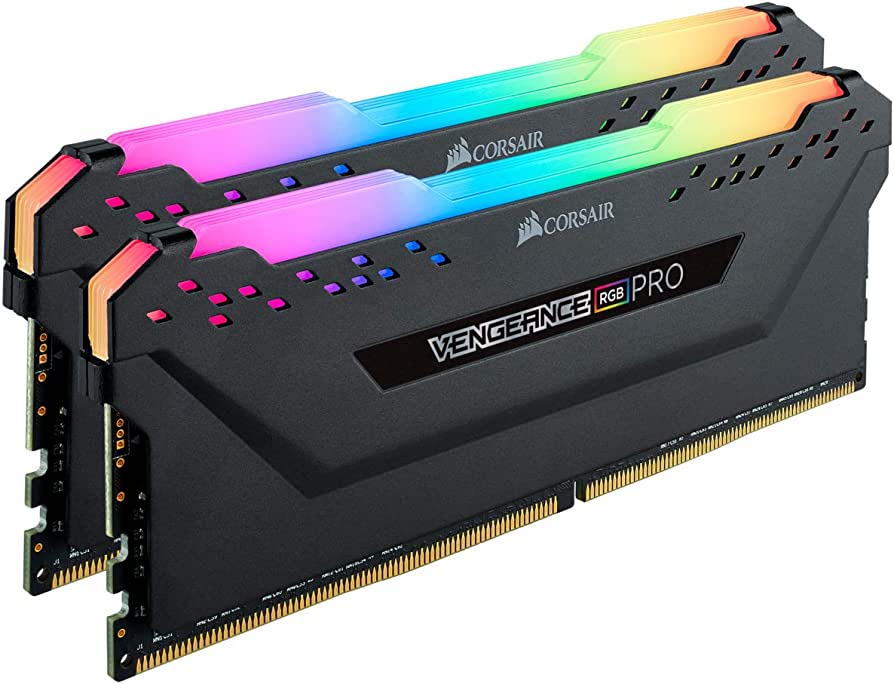
    A RAM Kit Is 64GB RAM Overkill

    When it comes to computer hardware, RAM, or Random Access, Memory is a crucial component that plays a significant role in determining the overall performance of your operating system. RAM is a memory used by your computer to store and access data quickly.

    Unlike your hard drive or SSD, which stores data permanently, RAM is a temporary storage medium used to store data currently being used by your computer. When you open an application or file, the data is loaded into your RAM, allowing your computer to access it quickly and efficiently.

    RAM is measured in gigabytes (GB) and is available in different types such as DDR, DDR2, DDR4, etc. The higher the RAM capacity, the higher RAM speeds and the more data your computer can store and access quickly, improving performance.

    Another important factor to consider regarding the performance of RAM is the optimal speed or frequency at which it operates, measured in MHz. The higher the MHz, the faster your RAM can transfer data, improving performance.

    In summary, RAM is a vital component of your computer that stores and accesses data quickly. The amount and speed of your RAM can significantly impact your computer’s overall performance.

    How Much RAM Do You Need?

    Regarding RAM, the amount you need largely depends on what you plan on using your computer for. Here are some guidelines to help you determine how much RAM you need for different types of use.

    For Everyday Use

    If you’re using your computer for everyday tasks like browsing the internet, checking email, and using productivity software like Microsoft Office, then 8GB of RAM is usually enough. However, if you have a lot of tabs open in your browser or run multiple applications at once, then 16GB of RAM Kit is more suitable.

    For Gaming

    When it comes to gaming, the amount of RAM you need largely depends on the game you’re playing and the settings you’re using. For most modern games, 16GB of RAM is recommended. However, if you’re playing more demanding games or using high-resolution textures, then 32GB of RAM may be necessary.

    For Video Editing and 3D Rendering

    You’ll need a lot of RAM working with video editing or 3D rendering software. For most users, 32GB of RAM is sufficient. However, if you’re working with huge files or using multiple applications at the same speed at once, then 64GB of RAM may be necessary.

    Overall, it’s important to have enough RAM to handle the tasks you plan on using your computer for. DDR4 RAM is currently the most common type of RAM recommended for most users. Remember to check the recommended RAM for any software you use to ensure you have more than enough memory around to handle your workload.

    Task Recommended RAM Everyday Use 8GB – 16GB Gaming 16GB – 32GB Video Editing and 3D Rendering 32GB – 64GB

    Is 64GB RAM Overkill?

    Regarding RAM, the question of how much too much ram is enough is always tricky. Some believe that more is always better, while others think more than a certain amount is overkill. So, is 64GB of RAM too much? Let’s take a closer look.

    First, it’s important to understand that the amount of RAM you need depends mainly on what you use your computer for. If you’re a casual user who mostly browses the web, checks email, and does some light word processing, then 64GB of RAM is overkill. Even 16GB or 32GB of RAM would be more than enough for your needs.

    On the other hand, if you’re a professional who works with demanding applications like video editing software, 3D modeling tools, or virtual machines, then 64GB of RAM might be the sweet spot. These applications can quickly eat up a lot of RAM, and having more of it can help improve performance and reduce lag.

    That being said, even for professionals, 64GB of RAM might still be more than they need. For example, suppose you’re a video editor who works with 4K footage. In that case, you might get by with 32GB or even 16GB of RAM, depending on the complexity of your projects and how many other applications you have running simultaneously.

    In conclusion, whether or not 64GB of RAM is overkill depends mainly on your specific needs and use case. It’s definitely too much for most casual users, while for some professionals, it might be just right. Like most things, it’s all about finding the right balance.

    When is 64GB RAM Necessary?

    If you consider upgrading your computer’s RAM, you might wonder whether 64GB is overkill. Here are some situations where 64GB of RAM might be necessary:

    Multitasking

    If you like to have multiple applications open simultaneously, 64GB of RAM can help ensure your computer doesn’t slow down or crash. This is especially true when using resource-intensive applications like video editing software or 3D modeling programs.

    Virtual Machines

    If you’re running multiple virtual machines on your computer, you’ll need a lot of RAM to ensure they run smoothly. Each virtual machine you have run simultaneously will require its allocation of RAM, so if you’re running multiple VMs simultaneously, you’ll need a lot of RAM to keep everything running smoothly.

    High-End Gaming

    If you’re a serious gamer, consider upgrading to 64GB of RAM. This is especially true if you’re playing games that require a lot of resources, like open-world games or games with high-resolution graphics.

    CAD and Professional Applications

    If you work with CAD software or other professional applications, you’ll need a lot of RAM to ensure your computer can handle the workload. These applications can be very resource-intensive, so you’ll need a lot of RAM to keep everything running smoothly.

    Future-Proofing

    Finally, 64GB of RAM is a good investment if you like to future-proof their computer. As applications become more resource-intensive, you’ll need more RAM to keep everything running smoothly. By investing in 64GB of RAM now, you can ensure that your computer can handle whatever applications come out in the future.

    Keep in mind that only some people need 64GB of RAM. If you’re using your computer for basic tasks like browsing the web and checking email, you probably won’t see much benefit from upgrading to 64GB of RAM. However, if you fall into any of the categories above, 64GB of RAM might be a good investment for you.

    What Are the Benefits of 64GB RAM?

    Performance

    If you are someone who uses your computer for heavy-duty tasks such as video editing, graphic design, or 3D rendering, then having 64GB RAM can significantly improve your pc’s performance. With more RAM, your computer can handle more tasks simultaneously, allowing you to work faster and more efficiently. You can open multiple applications and programs simultaneously without experiencing any lag or slowdowns.

    Moreover, if you love to play video games, then 64GB RAM can significantly boost smooth gaming experience and performance. With more RAM, you can run your games at higher settings with smoother frame rates. You’ll also be able to run multiple programs in the background while gaming, such as a music player or a web browser, without impacting your gaming experience.

    Functionality

    Aside from performance benefits, having 64GB RAM can also expand your computer’s functionality. With more RAM, you can run virtual machines and emulators with the same ease and speed, allowing you to test different operating systems or run legacy software. You can also run multiple instances of resource-intensive programs, such as Photoshop or Premiere Pro, without any issues.

    Furthermore, if you use your computer for data analysis or scientific simulations, then 64GB RAM can be a game-changer. With more RAM, you can work with larger datasets, run more complex simulations, and perform more sophisticated analyses.

    In summary, having 64GB RAM can significantly improve your computer’s performance and functionality, especially if you use your computer for heavy-duty tasks such as video editing, gaming, or scientific simulations.

    What Are the Drawbacks of 64GB RAM?

    Cost

    If you’re considering upgrading to 64GB of RAM, the cost is one of the most significant drawbacks. RAM prices have been volatile over the past few years, and 64GB of RAM is still quite expensive. You’ll need to factor in the cost of the RAM itself and any additional costs associated with upgrading your system, such as a new motherboard or power supply.

    Compatibility

    Another potential drawback of upgrading to 64GB of RAM is compatibility. Not all systems are designed to handle that much memory, and you’ll need to ensure your system is compatible before upgrading. This may require upgrading other components and computer memory, such as your motherboard or processor.

    In addition, some software applications may need to be optimized to take advantage of that much as much RAM. This means that generally speaking even if your system is compatible, you may only see a significant improvement in performance if you’re running memory-intensive applications.

    While 64GB of RAM can be beneficial for specific use cases, it may not be necessary for most users and can come with significant drawbacks. Before making the upgrade, consider the cost and compatibility issues carefully to determine if it’s the right choice.

    Conclusion

    In conclusion, choosing 64GB RAM ultimately depends on your specific needs and use case. Suppose you are a power user who engages in memory-intensive tasks such as video editing, 3D rendering, or virtualization. In that case, 64GB RAM may be a worthwhile investment to boost your system’s performance.

    However, for the average user who engages in basic tasks such as web browsing, document editing, video processing, and light gaming, 64GB RAM may be overkill. You may not even notice a significant difference in performance compared to a system with lower RAM capacity.

    It’s important to note that having more RAM does not necessarily equate to better performance. Other factors, such as the CPU, GPU, and storage, are crucial in determining overall system performance.

    Ultimately, the decision to invest in 64GB RAM should be based on your specific needs and budget. It’s always a good idea to research and consult with experts before deciding.

    In conclusion, while 64GB RAM may be overkill for most games and some users, it can be a valuable investment for power users who engage in memory-intensive tasks.

    Frequently Asked Questions

    Is 64GB of RAM too much?

    It depends on your usage. If you are a casual user who only uses your computer for web browsing, email, and primary productivity tasks, then 64GB of RAM is overkill. However, suppose you are a power user who runs multiple resource-intensive applications simultaneously, such as video editing software, virtual machines, or scientific simulations. In that case, 64GB of RAM may be necessary.

    Is 64GB RAM necessary for a gaming PC?

    For most gaming purposes, 64GB of RAM is overkill. Most modern games only require 8-16GB of RAM to run smoothly. However, if you are a streamer who likes to run multiple applications in the background while gaming, such as streaming software, voice chat apps, or video editing software, then 64GB of RAM may be necessary for a gaming PC.

    Is 64GB RAM worth it for video editing?

    If you are a professional video editor who works with large video files and complex projects, then 64GB of RAM can significantly improve your workflow and productivity. However, if you are a casual video editor who only works with small video files and simple projects, then 64GB of RAM is overkill.

    Is 64GB RAM overkill for most users?

    For most users, 64GB of RAM is overkill. You must be a power user who runs multiple resource-intensive applications simultaneously, such as video editing software, virtual machines, or scientific simulations to see significant improvement in performance with 64GB of RAM.

    Is 64GB RAM necessary for virtual machines?

    If you frequently use virtual machines for testing, development, or other purposes, then 64GB of RAM can significantly improve your virtual machine performance. However, if you only use virtual machines to play games occasionally or for simple purposes, then 64GB of RAM is overkill.

    Is 64GB RAM future-proof for upcoming games and software?

    It is hard to predict the future requirements of games and software. However, for most users, 64GB of RAM is overkill for the foreseeable future. Even if games and software become more demanding in the future, they will likely require more than 64GB of RAM for most users.

  • 35+ Magical Disney Plus Statistics That Prove This Streaming Service Is Here To Stay (Jul 2026)

    35+ Magical Disney Plus Statistics That Prove This Streaming Service Is Here To Stay (Jul 2026)

    Disney’s streaming service launched in November 2019. Disney Plus burst onto the streaming scene and quickly became a cultural phenomenon. Offering a treasure trove of beloved classics, original content, and a vast universe of Marvel and Star Wars adventures, Disney Plus has captivated audiences worldwide.

    Disney Plus Banner in the Philippines Disney Plus Statistics

    Due to its size and popularity, it comes as no surprise that this streaming platform is already one of the top apps found on Google Play Store and Apple App Store. But how big and how popular is Disney Plus?

    That’s what we’re here to find out.

    Key Disney Plus Statistics

    • In 2022, Disney’s media and entertainment business generated global revenue of $55.04 billion, marking a growth from the previous year’s $50.9 billion. This division encompasses their streaming platforms like Hulu and Disney Plus, as well as their traditional television networks like ABC [2].
    • In the second quarter of 2023, Walt Disney’s media and entertainment segment generated $13.6 billion in revenue, indicating a slight decline compared to the previous year’s figure of $14.04 billion for the same quarter [3].
    • Disney+ Hotstar, the leading video OTT provider in India, achieved a revenue of 32 billion Indian Rupees (approximately US$ 383 million) during the financial year 2022. This represents a significant increase compared to the previous year’s reported revenue of 16.7 billion Indian Rupees (roughly US$ 202 million). The majority of their revenue is derived from subscriptions and advertising [6],[7].
    • Disney Plus ranks as the fourth most sought-after streaming service, surpassing the other platforms below it by a factor of 3.17. Leading the pack is Apple TV, which maintains a significant advantage over its competitors with an expression 4.17 higher [17].
    • When it comes to the worldwide content spending of various media and streaming companies, Netflix is projected to allocate approximately $21.6 billion towards programming expenses in 2026. On the other hand, Disney Plus is anticipated to reach $19.8 billion in programming expenses for the same projected year [18].
    • By September 2020, Netflix had amassed approximately 201 million subscribers, solidifying its position as the leading subscription video-on-demand service globally. Trailing behind, Amazon Prime Video boasted 117 million users, while Disney Plus accumulated 82 million subscribers [19].
    • During Q2 2023, the global subscriber count for Disney Plus experienced a decline for the first time since its launch in 2019. At that time, the total number of subscribers stood at 157.8 million worldwide, reflecting a shortfall of 4 million compared to the previous quarter [28].
    • Anticipated growth lies ahead for the number of Disney Plus users in the USA over the next few years. By 2026, it is projected that Disney Plus will reach approximately 153 million subscribers. This represents a significant increase compared to the 110 million Disney subscribers recorded in the USA by the end of 2022 [29].
    • According to a survey conducted in the USA, Disney Plus is particularly popular among Millennial adults and Gen Z. Millennial adults, defined as individuals born between 1981 and 2012, comprise the primary demographic for the streaming platform. In contrast, only a mere two percent of baby boomers, born between 1946 and 1964, utilize the service [34].

    Disney Plus Revenue Statistics

    Revenue of Walt Disney Media and Entertainment Business Disney Plus Statistics
    • Disney Plus has a market capitalization worth $183 billion as of April 2021. Apple remains as the world’s largest company in terms of market capitalization with about $2.6 trillion [1].
    • As of 2022, Disney’s media and entertainment businesss earned $55.04 in global revenue, which was an increase from $50.9 billion recorded in the previous year. This segment covers their streaming services such as Hulu and Disney Plus and their linear networks such as ABC [2].
    • As of Q2 2023, Walt Disney’s media and entertainment segment earned $13.6 billion in revenue, a small decrease from $14.04 billion recorded the previous year for the same quarter [3].
    • As of Q2 2023, Walt Disney Company’s parks earned a net operating income of $2.8 billion while reporting a loss for its direct-to-consumer business valued at $800 million [4].
    • As of Q2 2023, Disney Plus, or Disney+, earned $4.44 for each paid subscriber, which is an increase from the $4.35 recorded the same quarter of the previous year [5].
    • Disney+ Hotstar, which is India’s top video OTT provider, earned 32 billion Indian Rupees (roughly US$ 383 million) for financial year 2022. The previous year, they reported 16.7 billion Indian Rupees (roughly US$202 million). Bulk of their revenue comes from subscriptions and advertising [6],[7].
    • Disney Plus was the highest grossing mobile app in Q3 2022, with over $228 million in in-app purchase revenues recorded worldwide [8].
    • It’s projected that Disney Plus’ advertising revenue will reach $5 billion by the year 2026, while streaming services such as Peacock and Netflix are expected to hit $2.7 billion and $1.7 billion, respectively [9].
    • Between 2022 and 2026, Disney Plus’s ad revenue is estimated to grow at 25% CAGR [10].
    • By 2023, Disney Plus is expected to hit $596 milion in ad revenue while Netflix is expected to hit $150 million [11].
    • A survey conducted back in November 2021 shows that most US Disney Plus users admitted that they subscribed to the streaminng platform because of the availability of Marvel franchise movies and TV shows on top of Star Wars and other content [12].

    In terms of market share and average revenue, the streaming platform proves that it’s making money for the Disney and it’s making more money than some of the streaming providers out there. In the next section, we’ll go over Disney Plus statistics against other streaming platforms.

    Disney Plus Statistics Compared With Other Streaming Services

    Most popular video streaming services Disney Plus Statistics
    • Netflix reported about 235 million paid subscribers worldwide as of Q1 2023 [13].
    • Amazon Prime Video is projected to reach 100 million subscribers by the end of 2027 [14].
    • As of Q1 2023, Warner Bros. Discovery reported about 98 million subscribers to its digital streaming services such as HBO, Discovery+, and HBO Max [15].
    • SVOD subscriptions around the world will continue to rise for 138 countries and it’s expected that the number of SVOD signups or subscriptions will hit the 1.7 billion mark by 2027 [16].
    • Disney Plus is the fourth most in-demand streaming service with an expression 3.17 higher than the other streaming platforms below it. Apple TV sits at the top with an expression 4.17 higher than its competitors [17].
    • In terms of global content spending of different media and streaming companies, Netflix will reportedly spend about $21.6 billion in programming expense for the year 2026. Disney Plus is expected to hit $19.8 billion in programming expense for that same projected year [18].
    • As of September 2020, there were about 201 million people subscribed to Netflix, making it the most popular subscription video-on-demand service around the world. They’re followed by Amazon Prime Video with 117 million users and Disney Plus with 82 million subscribers [19].
    • As of September 2022, HBO and HBO Max raked in 38 Primetime Emmy Awards. Netflix followed in second place with 26 Emmy Awards, Hulu in third place with 10 Emmy Awards, and Disney Plus in fourth place with 9 Emmy Awards [20].
    • As of Q4 2022, Paramount Global reported about 77 million subscribers worldwide, showing an increase from 56 million reported the previous year [21].
    • Apple TV+ paid subcribers totaled to about 25 million as of March 2022 [22].
    • Stranger Things remains as the most in-demand digital original content in the United States with an expression of 58 times higher than any other average title as of May 2023. The Mandalorian comes in second place with an expression 52 times higher than other titles [23].
    • Disney Plus boosted its content spending by 33% between 2021 and 2022, which is usually double or triple that of Netflix [24].
    • Searchlight Pictures garnered the most number of nominations during the 80th Golden Globes 2023 with 12 nominations. They are followed by A24 with 10 nominations and Netflix with 9 nominations. Walt Disney Studios Motion Pictures only received 5 nominations for that year [25].
    • Disney+ generated 158 high quality and almost 600 quality-rated movies on its streaming platform as of May 2023 [26].
    • Between Hulu and Disney Plus content, Hulu has about 900 quality-rated TV shows as of May 2023. Disney Plus only had 222 TV series with a quality label of at least 6.5 on IMDB [27].

    Walt Disney Company does a great job competing against the big three streaming services namely Netflix, Amazon Prime Video, and Apple TV. Their market share might not be as impressive as its competitors, but Disney Plus is growing at a rapid rate according to their average revenue per user.

    The success of the streaming platform can also be attributed to the addition of Disney Studios blockbusters from different franchises.

    Disney Plus Usage Statistics

    • As of Q2 2023, the number of Disney plus subscribers worldwide decreased for the first time since its launch in 2019. Around that time, there were only 157.8 million subscribers worldwide, showing a 4 million deficit from the previous quarter [28].
    • It’s expected that the number of Disney Plus users in the USA will increase within the next few years. Disney Plus will hit roughly 153 millin by 2026. In comparison, USA had 110 million Disney Subscribers by the end of 2022 [29].
    • In the Nordic region, there are more than 1.7 million households subscribed to Disney Plus as of Spring 2022. Sweden has the highest total of Disney Plus subscribers in the Nordic market with more than 600,000 [30].
    • In the UK, the number of households subscribing to the streaming platform has increased over the last few years. By the end of 2022, there were more than 7 million Disney Plus subscribers [31].
    • In France, the number of households subscribed to at least one SVOD (Subscription Video on Demand) has increased. More than 6 million households were subscribed to Netflix back in 2019 and that number skyrocketed to 10.5 million in a span of three years. As of April 2020, there were more than 3.6 million households subscribed to Disney+ [32].
    • As of September 2022, ESPNU, a Disney-owned college athletics channel, had 51 million subscribers while ESPN2 had about 74 million subscribers. Disney also acquired 21th Century Fox in 2019 and other channels like National Geographic, Fox, and Star India. This allowed Disney Plus to generate more than a hundred million new subscribers [33].

    Disney Plus Demographics

    • Disney Plus is most popular amongst the Millenial Adults and Gen Z according to a survey in the USA. Millenial adults refer to people who were born betgween 1981 and 2012. Only two percent of baby boomers, or those who were born between 1946 and 1964, use the streaming platform [34].
    • A survey conducted in the USA showed that 20% of Americans used the Disney Plus service daily. This group comprised of people between the ages of 18 and 34 years old. In comparison, two percent of people from the age group 65 years and up do the same [35].
    • 38% of Disney subscribers agreed that they would watch more if Disney+ offered more adult content in the USA according to a survey done in November 2021 [36].
    • In a 2021 survey, white people accounted for 71% of the number of people watching or using the service. In contrast, black people account for 9% of users consuming content on the streaming platform [37].
    • As of October 2022, 1 out of 4 parents in Brazil said that their children aged between 0 and 12 years old watch Disney Plus on their mobile apps [38].
    • As of March 2020, 23% of survey respondents in the United States held a Disney Plus subscription [39].

    Why Do People Prefer Disney Plus Over Other Major Streaming Services?

    Nostalgic Journey and Classic Content

    One of the primary reasons people love using Disney Plus is the opportunity to embark on a nostalgic journey through the beloved classics that have shaped childhoods for generations. From timeless Disney animated films like “The Lion King” and “Cinderella” to heartwarming Pixar movies like “Toy Story” and “Finding Nemo,” Disney Plus offers a treasure trove of cherished memories. Revisiting these timeless tales evokes a sense of nostalgia, allowing both children and adults to relive the magic.

    The Marvel and Star Wars Universe

    Disney’s acquisition of Marvel and Lucasfilm brought the Marvel Cinematic Universe and the Star Wars galaxy under the Disney Plus umbrella. This integration has been a game-changer for fans of superhero epics and intergalactic adventures. Disney Plus provides access to the entire Marvel Cinematic Universe, allowing fans to watch their favorite superheroes save the world time and time again. From Iron Man’s suit-up to the Avengers’ thrilling battles, it’s an immersive experience for Marvel enthusiasts.

    Similarly, Star Wars fans can indulge in the complete saga, from the original trilogy to the latest releases and spin-off series. The ability to stream the Star Wars films, along with exclusive shows like “The Mandalorian,” offers an unparalleled opportunity to explore the farthest reaches of the galaxy.

    Original Content and Exclusive Series

    Disney Plus has raised the bar in terms of original content and exclusive series, enticing subscribers with fresh, captivating narratives. The platform has successfully expanded popular franchises with original shows like “The Mandalorian,” introducing compelling characters like the adorable Grogu. These series have not only attracted existing fans but have also drawn in new audiences, adding depth and dimension to beloved universes.v

    The Wrap Up

    In a world of countless streaming platforms, Disney Plus stands out as a beloved favorite among viewers of all ages. With its extensive content library, exclusive original series, user-friendly interface, and a touch of Disney magic, it’s no wonder that millions of people around the globe have fallen in love with Disney Plus.

    Reference

    [1] https://www.statista.com/statistics/263264/top-companies-in-the-world-by-market-capitalization/
    [2] https://www.statista.com/statistics/193211/revenue-of-walt-disneys-media-network-business-since-2008/
    [3] https://www.statista.com/statistics/1028537/quarterly-revenue-walt-disney-company-by-segment/
    [4] https://www.statista.com/statistics/1040284/quarterly-income-loss-walt-disney-company-by-segment/
    [5] https://www.statista.com/statistics/1115395/disney-plus-average-revenue-per-subscriber-worldwide/
    [6] https://www.statista.com/statistics/1231769/india-hotstar-revenue/
    [7] https://www.statista.com/statistics/1031842/india-hotstar-revenue-by-type/
    [8] https://www.statista.com/statistics/1268392/iap-top-grossing-disney-apps-worldwide/
    [9] https://www.statista.com/statistics/1346648/ad-revenue-video-streaming-platforms-usa/
    [10] https://www.statista.com/statistics/1346476/video-streaming-ad-revenue-growth-usa/
    [11] https://www.statista.com/statistics/1283686/netflix-disneyplus-ad-revenue/
    [12] https://www.statista.com/statistics/1280662/importance-marvel-tv-series-on-disney-plus-us/
    [13] https://www.statista.com/statistics/250934/quarterly-number-of-netflix-streaming-subscribers-worldwide/
    [14] https://www.statista.com/statistics/648541/amazon-prime-video-subscribers-usa/
    [15] https://www.statista.com/statistics/1251687/d2c-video-subscribers-warner-bros-discovery/
    [16] https://www.statista.com/statistics/1235801/global-svod-subscriptions-and-subscribers/
    [17] https://www.statista.com/statistics/1035628/most-in-demand-streaming-services-global-share/
    [18] https://www.statista.com/statistics/1248339/content-spend-media-streaming-companies-worldwide/
    [19] https://www.statista.com/statistics/1052770/global-svod-subscriber-count-by-platform/
    [20] https://www.statista.com/statistics/750636/emmys-wins-network/
    [21] https://www.statista.com/statistics/1047393/cbs-all-access-subscribers-us/
    [22] https://www.statista.com/statistics/1136261/number-of-apple-tv-plus-subscribers-us/
    [23] https://www.statista.com/statistics/715140/most-in-demand-digital-original-shows-us/
    [24] https://www.statista.com/statistics/1299571/content-spending-disney-vs-netflix/
    [25] https://www.statista.com/statistics/289798/golden-globe-nominations-per-motion-picture-distributor/
    [26] https://www.statista.com/statistics/1386637/movie-quality-disney-plus-hulu/
    [27] https://www.statista.com/statistics/1386689/tv-shows-quality-disney-plus-hulu/
    [28] https://www.statista.com/statistics/1095372/disney-plus-number-of-subscribers-us/
    [29] https://www.statista.com/statistics/1347480/disney-plus-viewers-us/
    [30] https://www.statista.com/statistics/1300395/disney-plus-subscriptions-nordics/
    [31] https://www.statista.com/statistics/1109418/disney-plus-subscribers-uk/
    [32] https://www.statista.com/statistics/1313029/number-households-subscription-svod-france/
    [33] https://www.statista.com/statistics/294177/number-of-subscribers-to-selected-disney-owned-tv-channels/
    [34] https://www.statista.com/statistics/1117460/disney-plus-subscription-by-generation-us/
    [35] https://www.statista.com/statistics/1362123/disney-plus-frequency-united-states-age/
    [36] https://www.statista.com/statistics/1280646/share-viewers-more-disney-plus-adult-content-us/
    [37] https://www.statista.com/statistics/1279516/disney-plus-users-us-ethnicity/
    [38] https://www.statista.com/statistics/1346635/children-using-disney-plus-app-brazil/
    [39] https://www.statista.com/statistics/1117428/disney-plus-subscription-by-ethnicity-us/

  • Building the Ultimate Machine Learning PC: A Step-by-Step Guide

    Building the Ultimate Machine Learning PC: A Step-by-Step Guide

    Are you planning to build your machine learning PC but need help figuring out where to start? Look no further! Building your machine learning PC can be daunting, but with the right guidance, it can be a rewarding experience. A machine learning PC is designed for running machine learning models and algorithms. It requires powerful hardware components such as a high-end graphics processing unit (GPU), a large amount of memory (RAM), and a fast central processing unit (CPU).

    Before you start building your machine learning PC, you need to determine your budget and the requirements of your machine learning projects. The budget will determine the type and quality of the components you can use. The requirements of your machine learning projects will determine the amount of memory, GPU, and CPU processing power you need. Once you have determined your budget and requirements, you can start selecting the components for your machine learning PC. The following sections will guide you through building your machine learning PC, from choosing the parts to assembling the PC.

    Hardware Components

    High End PC Machine Learning PC

    When building a machine learning PC, choosing the right hardware components will help you achieve optimal performance is essential. Here are the key components you should consider:

    CPU

    The CPU is the brain of your machine learning PC. When choosing a CPU, you should look for a processor with a high core count and clock speed. Intel and AMD offer a range of CPUs that are suitable for machine learning tasks.

    GPU

    The GPU is the most important component of a machine learning PC. NVIDIA is the leading provider of GPUs for machine learning, and their GeForce and Quadro series are popular choices. When choosing a GPU, you should look for one with many CUDA cores and memory.

    RAM

    RAM is important for storing data during machine learning tasks. You should choose a RAM that has a high frequency and low latency. 16GB of RAM is the minimum requirement for most machine learning tasks, but you may need more depending on the size of your datasets.

    Storage

    Storage is important for storing your large data sets and models. You should choose an SSD for faster read and write speeds. A 500GB or 1TB SSD is recommended for most machine learning tasks.

    Motherboard

    The motherboard is the backbone of your machine learning PC. It would help if you chose a motherboard that is compatible with your CPU and GPU. Look for a motherboard that has a high number of PCIe slots for adding additional GPUs.

    Power Supply

    The power supply is vital for providing enough power to your machine learning PC. It would help if you chose a power supply with high wattage and 80+ certified for efficiency.

    Case

    The case is vital for keeping your machine learning PC cool and protected. It would help if you chose a case with good airflow and enough space for your components.

    Cooling

    Cooling is essential for keeping your machine learning PC running smoothly. It would be best if you chose a cooling solution suitable for your CPU and GPU. Liquid cooling is recommended for high-end components.

    GPU Selection

    When building a machine learning PC, selecting the right GPU is crucial. This section will discuss the different types of GPUs available, as well as their features and specifications.

    NVIDIA GPUs

    NVIDIA GPUs are the most popular choice among machine learning enthusiasts and the main choice for building high end computers. They are known for their high performance and excellent support for popular deep learning frameworks like TensorFlow and PyTorch. Some of the most popular NVIDIA GeForce RTX GPUs for machine learning include the 2080 Ti and the Titan RTX.

    AMD GPUs

    While NVIDIA GeForce RTX GPUs are the most popular choice for machine and deep learning models, AMD GPUs are also worth considering. AMD GPUs are known for their high memory bandwidth, which can benefit specific machine learning tasks and other AI workloads. However, they are less well-supported than a Nvidia graphics card regarding deep learning frameworks.

    GPU Memory

    When selecting a GPU for machine learning, it is essential to consider the amount of memory it has. The more memory a GPU has, the larger the models it can handle. Most modern GPUs come with at least 8GB of memory, but for larger models, consider a GPU with 16GB or more.

    Tensor Cores

    Tensor Cores are a specialized type of core found in certain NVIDIA GPUs. They are designed to accelerate matrix operations, a key component of many machine learning algorithms. If you plan on working with large models or datasets, a GPU with Tensor Cores can significantly speed up your model training times.

    CUDA Cores

    CUDA Cores are another important feature when selecting a GPU for machine learning. CUDA Cores are specialized processing units that are designed to accelerate parallel computations. The more CUDA Cores a GPU has, the faster it can perform certain machine learning tasks.

    In conclusion, selecting the right GPU is critical when building a machine learning PC. NVIDIA GPUs are the most popular choice, but AMD GPUs are also worth considering. When selecting a GPU, consider its memory, Tensor Cores, and CUDA Cores to ensure it can handle your machine learning demanding workloads.

    CPU Selection

    When building a machine learning PC, selecting the right CPU is crucial for achieving optimal performance. Here are some factors to consider when selecting a CPU.

    Intel CPUs

    Intel Core i9-11900K PRO Machine Learning PC

    Intel CPUs are known for their strong single-threaded performance, making them a popular choice for workstation and for machine learning applications. The Intel Xeon W and Intel Core i9 processors are excellent machine learning options. The Xeon W is higher budget, designed for workstation use and offers high core counts and support for ECC memory, while the Core i9 is a more affordable option with a high clock speed and good single-threaded performance.

    AMD CPUs

    AMD Ryzen™ Threadripper™ PRO Machine Learning PC

    AMD CPUs offer better multi-threaded performance than Intel CPUs, making them an excellent choice for machine learning applications that require parallel processing. The AMD Ryzen Threadripper Pro is a popular choice for machine and deep learning workstations, offering high core counts and support for PCIe 4.0. The AMD Ryzen 9 is a more affordable for deep learning workstation PCs, with good multi-threaded performance and a high clock speed.

    CPU Cores

    The number of CPU cores is important when selecting a CPU for machine learning. More cores allow for more parallel processing, greatly improving data science performance. However, more cores also mean a higher price tag. A CPU with at least eight cores is recommended for the PC build capable of most machine learning applications.

    Clock Speed

    Clock speed is another important factor when selecting a CPU for machine learning. A higher clock speed means faster single-threaded performance, which is important for some machine learning applications. However, a higher clock speed also means more heat and power consumption and can come at a premium price. For most machine learning applications, a CPU with a clock speed of at least 3.5 GHz is recommended.

    Memory Selection

    When building a machine learning PC, selecting the right memory is crucial for optimal performance. Here are key factors to consider when selecting memory for your machine learning PC build.

    RAM Speed

    The speed of your RAM can significantly impact the performance of your machine learning PC. Faster RAM allows quicker data transfer between the CPU and RAM, improving the speed of data processing and training. When selecting RAM, look for options with a higher clock speed, such as DDR4-3200 or DDR4-3600.

    DDR4 Memory

    DDR4 memory is the current standard for PC memory and is the recommended option for machine learning PCs. DDR4 memory provides faster data transfer rates and improved power efficiency compared to older DDR3 memory. When selecting DDR4 memory, consider the capacity you need. For most machine learning applications, 16GB or 32GB of DDR4 memory should be sufficient.

    VRAM

    In addition to system memory, your machine learning PC will require dedicated video memory (VRAM) if you use a GPU for training. VRAM is used to store data that the GPU is processing. When selecting a GPU, consider the amount of VRAM it has. A GPU with at least 8GB of VRAM is recommended for most machine learning applications.

    Selecting the right memory is crucial for building a powerful machine learning PC. Consider the speed of your RAM, the capacity of your DDR4 memory, and the amount of VRAM in your GPU when making your selection. By making informed choices, you can ensure that your machine learning PC is optimized for performance and can handle even the most demanding applications.

    Storage Selection

    When building a machine learning PC, the storage space is an important consideration. You need to ensure that your storage solution is fast, reliable, and able to store your data and applications. This section will discuss the different types of storage available and which one you should choose for your machine learning PC.

    SSD Selection

    Solid-state drives (SSDs) are faster and more reliable than traditional hard drives and disk drives (HDDs). They use flash memory to store data, which means they have no moving parts. This makes them less prone to failure and faster than HDDs. When selecting an SSD or hard drive for your machine learning PC, you should consider the following factors:

    • Capacity: SSDs come in different capacities, ranging from 128GB to 4TB or more. Choose an SSD with a capacity that meets your needs.
    • Interface: SSDs connect to your motherboard via a SATA or PCIe interface. PCIe SSDs are faster than SATA SSDs but are also more expensive.
    • Brand: Choose a reputable brand when selecting an SSD. Some of the most popular brands include Samsung, Crucial, and Western Digital.

    NVMe SSDs

    NVMe (Non-Volatile Memory Express) SSDs are even faster than traditional SSDs. They use the PCIe interface and the NVMe protocol to deliver faster read and write speeds. When selecting an NVMe SSD for your machine learning PC, you should consider the following factors:

    • Capacity: NVMe SSDs come in different capacities, ranging from 256GB to 2TB or more. Choose an NVMe SSD with a capacity that meets your needs.
    • Interface: NVMe SSDs use the PCIe interface, which is faster than the SATA interface used by traditional SSDs.
    • Brand: Choose a reputable brand when selecting an NVMe SSD. The most popular brands include Samsung, Western Digital, and Corsair.

    HDD Selection

    Traditional hard disk drives (HDDs) are slower and less reliable than SSDs. However, they are also cheaper and have larger capacities. When selecting an HDD for your machine learning PC, you should consider the following factors:

    • Capacity: HDDs come in different capacities, ranging from 1TB to 10TB or more. Choose an HDD with a capacity that meets your needs.
    • Interface: HDDs connect to your motherboard via a SATA interface. They are slower than SSDs but are also cheaper.
    • Brand: Choose a reputable brand when selecting an HDD. Some of the most popular brands include Western Digital, Seagate, and Toshiba.

    When selecting storage for your machine, deep learning workstation, or PC, you should consider your capacity, speed, and reliability needs. SSDs and NVMe SSDs are faster and more reliable than HDDs but are also more expensive. HDDs are cheaper and have larger capacities but are slower and less reliable. Choose the storage solution that meets your needs and budget.

    Motherboard Selection

    When building a machine learning PC, choosing the right motherboard is crucial. It is the backbone of your system and determines the compatibility of all your other components. Here are some factors to consider when selecting a motherboard for your machine learning PC.

    PCIE Slots

    PCIE slots are essential for any machine learning PC as they provide the bandwidth for high-speed data transfer between your GPU and CPU. When selecting a motherboard, ensure it has at least one PCIE 3.0 x16 slot to accommodate your graphics card. If you use multiple GPUs, look for a motherboard with multiple PCIE slots, preferably with PCIE 3.0 x16 bandwidth.

    Form Factor

    The form factor of your motherboard determines the size and shape of the board. The most common form factors are ATX, Micro-ATX, and Mini-ITX. ATX motherboards are the largest and offer the most expansion slots and features. Micro-ATX motherboards are smaller and have fewer expansion slots but are still suitable for most machine learning PC builds. Mini-ITX motherboards are the smallest and have limited expansion capabilities but are perfect for compact builds.

    When selecting a motherboard, consider the form factor of your case and the size of most tasks your other components. For example, if you plan on using a large CPU cooler or multiple GPUs, you may need an ATX motherboard to accommodate them.

    In summary, when selecting a motherboard for your machine learning PC, ensure it has the necessary PCIE slots and form factor to accommodate your processor and other components. Consider the size of your case and other components, and choose a motherboard that offers the features and expansion capabilities you need.

    Software Components

    You must have the right software components to build a machine learning PC. These include the operating system, machine learning frameworks, libraries, and package managers. Here’s what you need to know about each of them.

    Operating System

    The operating system you choose can affect the performance of your machine learning PC. Most machine learning frameworks and libraries work well with Linux-based operating systems, such as Ubuntu, Debian, or CentOS. You can also choose to use Windows 10 or macOS, but you may need to install additional software or drivers to get everything working smoothly.

    Machine Learning Frameworks

    Machine learning frameworks are essential for building and training machine learning models. Some popular frameworks include TensorFlow, PyTorch, and Keras. TensorFlow is an open-source platform for building and training machine learning models, while PyTorch is a popular deep learning framework that provides dynamic computation graphs. Keras is a high-level neural networks API that is easy to use and supports both TensorFlow and Theano backends.

    Libraries

    Libraries are collections of pre-written code that you can use to build machine learning models. Some popular libraries include Scikit-Learn, OpenCV, Numpy, Matplotlib, and Pandas. Scikit-Learn is a machine learning library for Python that provides simple and efficient tools for data mining and data analysis. OpenCV is a computer vision library that provides real-time computer vision and machine learning capabilities. Numpy is a Python programming language library that supports large, multi-dimensional arrays and matrices. Matplotlib is a plotting library for Python that provides high-quality 2D and 3D plots. Pandas is a library for data manipulation and analysis.

    Package Managers

    Package managers are tools that make it easy to install and manage software packages. Some popular package managers include Anaconda, pip, and Conda. Anaconda is a package manager, an environment manager, and a Python and R programming languages distributor. Pip is a package manager for Python that allows you to install and manage software packages easily. Conda is a package and environment manager that allows you to create virtual environments for different projects and manage the dependencies of your projects.

    In summary, to build a machine learning PC, you need to have the right software components, including the operating system, machine learning frameworks, libraries, and package managers. Choosing the right components can affect the performance of your machine learning PC, so it’s essential to do your research and choose wisely.

    Building the PC

    Building a machine learning PC can be daunting, but with the right guidance, you can easily build one that suits your needs. This section will guide you through building your machine for ai deep learning, PC, from assembly to installation, computing power, and configuration, and finally, testing.

    Assembly

    Before assembling the PC, you must ensure that you have all the necessary hardware components. You should have a motherboard, CPU, RAM, GPU, storage device, power supply, and a computer case. Once you have all the components, you can start the assembly process.

    1. First, attach the CPU to the motherboard, ensuring the pins are aligned correctly.
    2. Install the RAM into the motherboard’s memory slots, ensuring that the side clips click into place.
    3. Install the GPU into the PCIe slot on the motherboard, ensuring it clicks into place.
    4. Install the storage device into the appropriate slot in the computer case.
    5. Attach the motherboard to the computer case, ensuring it is securely fastened.
    6. Connect the power supply to the motherboard and other components.

    Installation and Configuration

    Once you have assembled the PC, you must install and configure the necessary software components. You should install the operating system, drivers, and machine learning libraries.

    1. Install the operating system of your choice, such as Windows, Linux, or macOS.
    2. Install the drivers for your hardware components, such as the GPU driver.
    3. Install machine learning libraries like TensorFlow, PyTorch, or Keras.

    Testing

    After installing and configuring the software components, you should test the system to ensure that almost everything works correctly. You can run benchmark tests to evaluate the system’s performance.

    1. Run benchmark tests like TensorFlow’s benchmark suite to evaluate the system’s performance.
    2. Ensure that the GPU is utilized correctly by running a GPU stress test.
    3. Verify that the machine learning libraries are working correctly by running sample code.

    Building a machine learning PC is a challenging but rewarding task. Following the steps outlined above, you can build a powerful machine learning PC that meets your needs. Remember to take your time and ensure you have all the necessary hardware and software components before starting the building process.

    Conclusion

    Building a machine learning PC can be daunting, but with the right knowledge and tools, it can be a rewarding experience over a decade. Here are some key takeaways to keep in mind when building your machine learning PC:

    • Choose the right GPU: The GPU is the most important component of a machine learning PC. Make sure you choose a GPU that is optimized for machine learning tasks.
    • Consider your CPU and RAM: While the GPU is the most important component, you still need a good CPU and enough RAM to support your machine learning tasks.
    • Invest in good cooling: Machine learning tasks can be very demanding on your PC, so investing in good cooling is crucial to ensure your PC runs smoothly and doesn’t overheat.
    • Choose the right power supply: Make sure you choose a power supply that can handle the power requirements of your machine learning PC.
    • Remember storage: Machine learning tasks can require a lot of storage, so make sure you choose a fast storage option with enough capacity.

    Overall, building a machine learning PC can be a great way to save money and get the maximum performance that you need for your machine learning tasks. With the right components and a little knowledge, you can build a machine learning PC that can handle even the most demanding tasks.

  • What is Rendering in Digital Art?

    What is Rendering in Digital Art?

    If you’re new to digital art, you may have heard the term “rendering” thrown around, but you might not be entirely sure what it means. In short, rendering takes an image from a rough, unfinished state to a polished, finalized state. This process involves adding details and textures to digital photos and working on lighting and shading to create a more realistic and visually appealing final product.

    Rendering is an essential aspect of digital art and is used in a variety of applications, including video games, animated movies, and architectural designs. It allows artists to simulate real-world lighting, shadows, and materials to create photorealistic images and animations. While the rendering process can be time-consuming and complex, the result is visually stunning digital art that can be used for various purposes.

    Definition

    The Mandalorian Artwork What Is Rendering in Digital Art

    What Is Rendering in Digital Art?

    Rendering in digital art takes a painting from a rough state to a more polished finished state. It is primarily concerned with working on lighting/shading and adding details/textures. It is an essential aspect of digital art and refers to generating a final rendering, either rendering or image synthesis, or animation based on a set of inputs.

    Rendering is used to simulate real-world lighting, shadows diffuse surfaces, and materials to make computer-generated images and create photorealistic images and animations. In digital art, rendering is done in several distinct stages and is always connected to the other sub-topics of 3D computer graphics.

    The term “rendering” is also used to describe calculating effects in a video editing program to produce the final video output. It is used for rendering various digital projects, including video games, animated movies, various graphics engines and architectural designs.

    In summary, rendering in digital art is a process that involves taking a rough painting and refining it to a more polished state. It simulates real-world, lighting effects, shadows, and materials to create photorealistic images and animations. It is an essential aspect of digital art used in various static digital art projects.

    Types of Rendering

    When it comes to rendering in digital art, there are two main types of pre-rendering: real-time rendering and offline rendering.

    Real-Time Rendering

    Real-time rendering is a technique used in video games and interactive applications that allows instantaneously generating interactive rendering of images. This type of rendering is achieved through a real-time render engine, which can process around 15 frames per second (FPS) or more. Real-time rendering is essential for creating interactive experiences, allowing users to interact with the environment in real time.

    Real-time rendering is achieved through specialized computer software and hardware, which work together to create the illusion of motion and depth. This type of rendering is beneficial for creating video games, as it establishes immersive and dynamic environments that respond to the player’s actions.

    Offline Rendering

    On the other hand, offline rendering is a technique used to make computer generated image create high-quality still images and animations. This type of rendering is achieved through specialized software, which allows for creating complex lighting and shading effects that would be difficult or impossible to achieve in real time.

    Offline rendering is particularly useful for creating photorealistic images and animations, as it creates highly detailed and realistic environments. This type of digital rendering is often used to make films, commercials, and other high-quality visual media.

    Overall, both real-time rendering and offline rendering have their unique advantages and disadvantages, and the choice between them will depend on the project’s specific needs. Whether you are creating a video game or a film, understanding the differences between these two types of rendering is essential for achieving the desired results.

    Rendering Techniques

    When it comes to rendering techniques in digital art, there are several methods that many artists and designers use to create their final images. Here are three standard rendering techniques: rasterization, ray tracing, and radiosity.

    Rasterization

    Rasterization is a rendering technique that involves converting 3D models into 2D images. This process involves breaking down the 3D model into a series of triangles rendered onto a 2D plane. This technique is commonly used in video games and real-time applications because it is fast and efficient.

    One of the benefits of rasterization is that it allows for real-time rendering of complex 3D scenes. However, rasterization has some limitations. For example, it can produce jagged edges and aliasing artifacts, making the final image pixelated or blurry.

    Ray Tracing

    Ray tracing is a rendering technique that simulates the behavior of light in a 3D scene. This technique involves tracing the path of light rays as they bounce off objects in the scene and interact with light reflection from the camera. Ray tracing can produce highly realistic images with accurate lighting and reflections.

    One of the benefits of ray tracing is that it can produce photorealistic images with proper lighting and reflections from natural light. However, ray tracing is computationally expensive and can take longer to render complex scenes.

    Radiosity

    Radiosity is a rendering technique simulating how light bounces between surfaces in a 3D scene. This technique involves dividing reflected light from the scene into small patches and calculating the light absorbed and reflected by each patch. Radiosity can produce highly realistic images with accurate lighting and shadows.

    One of the benefits of radiosity is that it can produce highly realistic images with accurate dynamic lighting effects and shadows. However, radiosity is computationally expensive and can take longer to render complex scenes.

    Rendering Software

    Regarding digital art, rendering software is a crucial part of the process. It is the tool that allows you to create photorealistic images and bring your ideas to life. Many many different rendering programs and software options are available, but some of the most popular ones are Autodesk 3ds Max, Blender, Cinema 4D, and Maya.

    Autodesk 3ds Max

    Autodesk 3ds Max is a professional 3D modeling, animation, and rendering software that is widely used in the film, television, and gaming industries. It offers many features, including advanced particle and physics simulations, character rigging tools, and a powerful scripting language for customization and automation.

    Blender

    Blender is a free, open-source 3D creation software popular among artists and designers. It includes a wide range of modeling, animation, and rendering tools, as well as support for advanced features like physics simulations and compositing. Blender has an active community of users and developers who contribute to its ongoing development.

    Cinema 4D

    Cinema 4D is a professional 3D modeling, animation, and rendering software that is known for its ease of use and intuitive interface. It offers many features, including advanced character animation tools, motion graphics, and physical rendering capabilities. Cinema 4D is used in a variety of industries, including film, television, and advertising.

    Maya

    Maya is a professional 3D modeling, animation, and rendering software widely used in the film, television, and gaming industries. It offers many features, including advanced character animation tools, particle and fluid simulations, and a powerful scripting language for customization and automation. Maya is known for its flexibility and is often used with other software tools to create complex visual effects.

    Rendering Hardware

    When it comes to rendering in digital art, hardware plays a crucial role. The hardware you use can significantly affect the time it takes to render a project, the quality of the final output, and the overall user experience. This section will discuss the different types of rendering hardware available for digital artists.

    CPU Rendering

    The CPU, or central processing unit, is the brain of your computer. It handles all the calculations required to run your applications, including rendering. CPU rendering is the most common type of rendering and is the rendering program used by many popular digital art software programs.

    Regarding CPU rendering, the number of cores and clock speed are the most critical factors. The more cores your CPU has, the more calculations it can perform simultaneously, significantly reducing rendering times. Similarly, a higher clock speed means that each core can perform calculations faster, lowering rendering times.

    GPU Rendering

    GPU, or graphics processing unit, rendering is a newer technology that uses the graphics card to the graphics pipeline perform rendering calculations. GPU rendering can be significantly faster than CPU rendering, especially for complex scenes with many light sources and textures.

    Regarding GPU rendering, the amount of VRAM, or video memory, is the most important factor. VRAM is used to store textures and other data required for rendering. The more VRAM your graphics card has, the more complex scenes it can handle.

    Distributed Rendering

    Distributed rendering is a technique that allows you to use multiple computers to render a single project. This can significantly reduce rendering times, especially for large projects that take days or weeks to render on a single computer.

    To use distributed rendering, you need to have multiple computers connected to a network. Each computer is assigned a portion of the image file the project renders, and the results are combined to create the resulting image and final output. Some digital art software programs have built-in support for distributed rendering, while others require additional software installation.

    In conclusion, choosing the right hardware for rendering in digital art is crucial. Whether you opt for CPU or GPU rendering or choose to use distributed rendering, consider the factors mentioned above to ensure the best possible results for digital image.

  • 15+ Unbelievable Amazon Prime Statistics For (Jul 2026)

    15+ Unbelievable Amazon Prime Statistics For (Jul 2026)

    Amazon Prime is a subscription-based service offered by Amazon to its customers. It provides benefits such as free and fast shipping, access to streaming services, and exclusive discounts on products. Since its launch in 2005, Amazon Prime has grown to become one of the most popular subscription services worldwide.

    According to recent statistics, Amazon Prime has over 200 million subscribers globally, with 147 million based in the United States alone. The number of US households with an Amazon Prime subscription is expected to reach 187.2 million by 2023. Amazon Prime Day, an annual shopping event exclusive to Prime members, has also become a significant revenue generator for the company. In 2022, Amazon Prime Day sales reached $11.19 billion, up from $10.4 billion in 2021.

    Key Amazon Prime Statistics

    Amazon Prime Video Logo Amazon Prime Statistics

    Amazon Prime is a popular subscription service that offers a variety of benefits to its members, including free two-day shipping, access to streaming services, and more. Here are some key statistics related to Amazon Prime.

    • There are more than 200 million Amazon Prime users around the world as of 2022 [1].
    • There are more than 172 million Amazon Prime users in the USA alone [2] [3].
    • Amazon spent more than $20 billion in advertising and promotions for the year 2022 [4].
    • Amazon Prime Day revenue hit $12.09 billion in 2022, showing an 8% increase from the previous year [8] [9].
    • In July 2022, Amazon Prime Day lasted for 48 hours and will stay in that duration for the foreseeable future [10].
    • As of 2022, there are more than 160 million users in the United States alone and the numbers will increase to 176 million by the end of 2025 [17].
    • 65% of Amazon shoppers are also Amazon Prime subscribers [18].
    • People born between 1980 and 1989 make up most of the Amazon Prime user demographics [19].
    • 81% of Americans between the ages of 18 and 34 are Amazon Prime members [20].

    Amazon Prime Revenue

    • There are currently more than 200 million Amazon Prime users around the world as of 2022. Back in 2019, there were only about 150 million users reported. However, growth outside the USA has been reportedly slow [1].
    • In the USA alone, there are more than 172 million members as of 2021 [2],[3].
    • Amazon spent more than $20 billion in advertising and promotional costs in 2022 alone, which was a drastic increase from the $16.9 billion spent the previous year [4].
    • Amazon Prime video revenue totaled to $5.16 billion as of 2022, almost half a billion up from the previous year annual net sales of $4.63 billion [4].
    • It’s reported that more than 1/3 of Amazon Prime subscribers spend an average of $50 to $100 a month on the platform [5].
    • Amazon Prime comprises 19% of the market share of SVOD services in 2022, which was a 3% increase from 2020. Netflix holds the highest market share among the US streaming services with 21% [6].
    • Amazon’s net revenue from their subscription services totaled to $35.22 billion in 2020. Amazon Prime reported that there were 200 million paying members by the end of the year [14].

    From the numbers alone, it’s clear that Amazon Prime membership generates a lot of revenue for Amazon. Amazon Prime subscriptions are recurring and it’s clear how big of an impact they have on overall Amazon Prime growth [7].

    In the next section, we’ll go over the most sought-after holiday of all time: Amazon Prime Day.

    Amazon Prime Day Sales and Statistics

    • In 2022, Amazon Prime Day revenue was reported to hit $12.09 billion, which is an 8% increase from the previous year [8].
    • That same year, Amazon Prime Day sales increased by 8.1% from the previous year. That year, they generated close to $12 billion in revenue for the entirety of the shopping event [9].
    • In July 2022, Amazon Prime Day was announced that it will lasted for 48 hours and will remain that duration for the foreseeable future [10] .
    • Consumer Electronics saw a drastic decrease in sales during last year’s Amazon Prime Day, even though it was one of the top-performing categories in the USA [11]. The other top four categories saw an increase in sales growth, with Beauty and Health showing the highest increase in sales at 26% [11].
    • In Canada, sales from sponsored ads increased by 281% during Amazon Prime Day in 2022. The USA reported a 236% increase in sales from sponsored ads for the same year [12],[13].
    • During the 4th quarter of 2022, Amazon saw an increase in their global net revenue across online stores compared to the previous quarter. This means that their net revenue for that quarter was $36.3 billion [15].
    • 83% of Amazon marketplace offered Prime shipping service as of 2021. In [16].

    Amazon Prime Day is an annual shopping event exclusively for Amazon Prime members. During this event, Amazon offers exclusive deals and discounts on a wide range of products across various categories, including electronics, fashion, home, and more. The event typically lasts for two days and is usually held in July, although the exact date may vary from year to year.

    Amazon Prime Day is a big deal because it offers Prime members the opportunity to purchase products at significantly discounted prices. It’s also a chance for Amazon to boost its sales and attract new customers to its Prime membership program. In addition, the event creates a sense of excitement and urgency among shoppers, who are often eager to take advantage of the limited-time deals before they expire.

    Amazon Prime Demographics

    • It’s predicted that the number of Amazon Prime users in the United States will dramatically increase over the next few years. It’s projected that Amazon Prime will have more than 176 million users, an increase from 2022’s 163.5 million users recorded [17].
    • In 2021, 65% of Amazon online shoppers were also members of Amazon Prime. This number has been consistent since 2019 [18].
    • People born between 1980 and 1989 used the Amazon Prime services in the United States more than any other age demographic. 80% of the survey participants belonged to this age group and were Amazon Prime subscribers [19]
    • 81% of Americans between the ages of 18 and 34 are Amazon Prime members while the average Amazon customer is typically a woman over the age of 40 [20].
    • According to a 2019 survey, the average Amazon shopper has an annual household income of $84,449, a tad higher from Walmart shoppers ($76,313) [21].
    • 40% of Amazon Prime members visit and use the platform daily [22].
    • 40% of Amazon Prime shoppers are comfortable with using the platform and have no problem purchasing or shopping through the site. 10% of these service members make at least one purchase daily [23].
    • Amazon Prime retains 93% of their members who sign up after one year. As of 2021, their retention rate for 30 days was 69%, which was a 93% increase a year after the platform was launched in 2015 [24].

    The Wide Reach of Amazon Prime

    Amazon Prime has a global reach, with the service available in over 20 countries. As of 2021, Amazon has over 200 million Prime subscribers worldwide, with 147 million based in the United States. The service has also seen growth in other countries, such as India, where it has over 25 million subscribers.

    Amazon Prime’s global reach has also been expanded through partnerships with other companies. For example, in the United Kingdom, Prime members can receive free delivery from select restaurants through a partnership with Deliveroo. In Japan, Prime members can receive discounts on products at select convenience stores.

    Overall, Amazon Prime has become a popular choice for customers looking for a variety of benefits, from free shipping to access to exclusive deals and streaming content. Its global reach and partnerships with other companies have helped to expand its reach and appeal to customers around the world.

    Reference

    [1] https://www.aboutamazon.com/news/company-news/2021-letter-to-shareholders

    [2] https://files.constantcontact.com/150f9af2201/2b8bc940-e1e4-4152-a221-096965c87646.pdf

    [3] https://www.statista.com/statistics/1223385/amazon-prime-subscribers-in-the-united-states/

    [4] https://www.statista.com/statistics/678153/amazon-ad-cost/

    [5] https://www.statista.com/statistics/1274279/monthly-spending-on-prime-amazon-users-united-states/

    [6] https://www.statista.com/statistics/1052770/global-svod-subscriber-count-by-platform/

    [7] https://www.mediaplaynews.com/justwatch-netflix-third-quarter-market-share-remains-tops-among-u-s-streamers-despite-sub-losses/

    [8] https://www.statista.com/statistics/728120/annual-amazon-prime-day-sales/

    [9] https://www.statista.com/statistics/726674/yoy-amazon-prime-day-growth/

    [10] https://www.statista.com/statistics/1014999/annual-amazon-prime-day-duration/

    [11] https://www.statista.com/statistics/1338769/amazon-prime-day-sales-growth-by-category-united-states/

    [12] https://www.statista.com/statistics/1378477/amazon-prime-day-sponsored-ads-sales-growth-canada

    [13] https://www.statista.com/statistics/1378462/amazon-prime-day-sponsored-ads-sales-growth-united-states/

    [14] https://www.statista.com/statistics/672747/amazons-consolidated-net-revenue-by-segment/

    [15] https://www.statista.com/statistics/999686/amazons-net-revenue-by-product-group-quarter/

    [16] https://www.statista.com/statistics/1242240/amazon-marketplace-share-of-sellers-offering-prime-shipping/

    [17] https://www.statista.com/statistics/504687/number-of-amazon-prime-subscription-households-usa/

    [18] https://www.statista.com/statistics/234253/share-of-amazon-prime-subscribers-in-the-united-states/

    [19] https://www.statista.com/statistics/304940/amazon-prime-us-age-distribution/

    [20] https://www.statista.com/statistics/304940/amazon-prime-us-age-distribution/#:~:text=As%20of%20January%202020%2C%2081,increased%20across%20all%20age%20groups.

    [21] https://www.businessinsider.com/amazon-shoppers-richer-than-walmart-2020-1

    [22] https://feedvisor.com/resources/amazon-marketing-advertising-strategies/2021-amazon-consumer-behavior-report/

    [23] https://www.statista.com/statistics/1251860/amazon-prime-retention-rates/

    [24] https://www.statista.com/statistics/1274977/prime-vs-non-prime-perception-on-amazon/

  • 120 vs 140 Fans: Comparing Performance and Efficiency

    120 vs 140 Fans: Comparing Performance and Efficiency

    Selecting the right cooling components is critical for maintaining optimal system performance when building or upgrading your PC. Among the choices you’ll face are whether to use 120mm or 140mm fans. This decision may seem trivial at first, just more cooling power but their differences can noticeably impact your system’s overall performance and acoustic level.

    As you weigh your options, remember that 140mm fans generally offer better cooling and airflow due to their larger size, while 120mm fans are lighter and more universally compatible with different case sizes. However, other variables are to consider, such as fan speed (RPM), airflow capacity, and noise level measured in decibels (dB).

    By comparing these factors and considering the specific needs of your PC build, you can make an informed decision and choose the ideal cooling solution for your computer. Ultimately, the key point is to balance cooling performance, noise levels, and compatibility.

    120mm vs 140mm Fans: Fundamentals

    Side by Side 120 vs 140 fans

    Size and Dimensions

    When choosing between 120mm and 140mm fans for your PC build, it’s essential to consider the size and dimensions of these two fans first. The 120mm fan has dimensions of 120mm x 120mm x 25mm, making it a common choice for many users due to its compact design1. On the other hand, the 140mm fan features dimensions of 140mm x 140mm x 25mm, providing a slightly larger surface area for improved cooling potential2.

    Noise Levels

    Noise levels are another critical factor to take into account. Generally speaking, 140mm fans operate at lower RPMs and produce less noise than 120mm fans, making them a preferred choice for a quieter PC setup3. However, technological advancements also allow 120mm fans to be relatively quiet while maintaining optimal cooling performance.

    RPM and Airflow

    Revolutions per minute (RPM) and airflow play a crucial role in determining the efficiency of the fans. 120mm fans can spin at higher RPMs, leading to better cooling power and airflow3. In contrast, 140mm fans spin slower but have a larger surface area, offering better cooling performance and airflow. When comparing these two sizes, it’s essential to consider your PC build’s unique requirements and balance the need for airflow and rpm.

    Static Pressure

    Static pressure is another vital parameter that directly impacts the cooling capabilities of your PC fans. Both 120mm and 140mm fans can be designed with high static pressure in mind, but larger fans, such as the 140mm fans, generally generate higher static pressure due to their broader surface area. Higher static pressure allows the fans to push hot air much more effectively through tight spaces and components, such as heat sinks and radiators4.

    When selecting the correct fan size for your PC build, consider the physical dimensions and performance metrics (noise levels, RPM, airflow, and the static pressure rating). Choose the fan size that provides the right performance and compatibility with your system while considering your priorities: quiet operation, efficient cooling, or a suitable balance between both.

    Performance and Compatibility

    When choosing between 120mm and 140mm case fans for your PC build, it’s essential to consider both performance and compatibility factors. This section will discuss cooling performance, compatibility with cases, and CPU and heatsink cooling to help you make an informed decision.

    Cooling Performance

    The primary purpose of any fan is to provide cooling to the entire system. In general, 140mm fans offer better performance, cooling, and airflow than their 120mm counterparts. As a result, 140mm case fans are more efficient in keeping your system cool, allowing your components to run at optimal CPU temperatures. However, it’s important to remember that performance can vary among individual fans, so always check the specifications of the various mm fans you are interested in.

    Compatibility with Cases

    One significant factor to consider is the compatibility of your chosen fan with your PC case. While 120mm case fans are more common and compatible with most cases, including HTPC, Mini ITX, and Micro ATX cases, 140mm fans are often limited to specific ATX casing. So, always ensure that your case has the appropriate slots and dimensions to accommodate your chosen fan size.

    CPU and Heatsink Cooling

    Regarding CPU and heatsink cooling performance, PC cooling options like 140mm case fans offer improved static pressure and airflow, resulting in quieter operation and more efficient cooling. On the other hand, 120mm fans may offer decent cooling performance but might be slightly noisier than 140 mm one. Depending on your cooling requirements and noise tolerance, weigh the pros and cons of each fan size.

    Considering all the abovementioned factors, you can carefully decide whether a 120mm or 140mm fan is the best option for your specific build and cooling needs. Always check the dimensions and compatibility of your PC case and components before investing in case fans to ensure an excellent fit and adequate cooling performance.

    Aesthetics and Additional Features

    RGB Lighting

    When it comes to aesthetics, RGB lighting has become increasingly popular for fans. This feature adds a touch of personalization to your build and can make it stand out. Both 120mm and 140mm fans are commonly available with RGB lighting options. Keep in mind that while it’s a visually appealing aspect, it doesn’t affect the overall performance of the fans.

    Dust and Positive Pressure

    When selecting fans, it’s essential to consider dust accumulation and positive pressure within your system. A higher CFM rating means larger blades so the fan can effectively push more air through your system, and investing in fans with higher CFM ratings should help maintain positive air pressure in the case. This positive pressure prevents dust from being drawn into the system through the gaps, helping to keep your components clean.

    120mm fans are often thinner and smaller than their 140mm counterparts; as a result, they may have a lower CFM rating. Although 140mm fans typically have a higher width and thickness, they usually move more air through the system, which can contribute to a cleaner and healthier environment for your components.

    Dust Filters

    Regardless of your fan size, incorporating dust filters into your build can further protect against dust accumulation. They’re designed to capture particles before they enter the cooling system, while maintaining adequate airflow. Both 120mm and 140mm fans can be used with dust filters, but always verify compatibility with your particular case and fans.

    By carefully considering aesthetics, RGB lighting, dust prevention, and positive pressure, among other fans, you can better determine whether a 120mm or 140mm fan fits your computer. Remember, a well-planned and clean system not only looks better but can also help ensure your components’ longevity and efficient performance.

    Price, Value, and Warranty

    Cost Comparison

    Regarding cost comparison between 120mm computer fans and 140mm case fans, 120mm fans tend to be cheaper than their 140mm counterparts; however, the price difference may not always be significant, and other factors, such as performance, compatibility, and brand reputation, influence your choice.

    Cost-Effectiveness

    In terms of cost-effectiveness, it’s essential to consider not only the price but also the performance and features of the case fans. While 140mm fans tend to perform better and run quieter, they may not fit into all cases, which could limit their usefulness. On the other hand, 120mm fans are more common, compatible, and available with various performance specs at different price points.

    Warranty and Customer Support

    Warranty and customer support are vital when purchasing case fans for your build. Top-tier brands such as Arctic, Noctua, Corsair, and Cooler Master are known for their reliable products and after-sales service. These brands often offer more extended warranty periods and superior customer support. For instance, the Arctic P series (120mm and 140mm fans) are known for their performance, quality, and affordability.

    To sum it up, it’s essential to weigh the cost, performance, compatibility, and warranty factors when choosing between 120mm and 140mm case fans for your build. Doing so can ensure an optimal balance between price, power, value, and long-term reliability.

    Types of Bearings and Lifespan

    Bearing Types

    There are several types of bearings used in case fans. The most common ones are sleeve, ball, and fluid-dynamic bearings. Each of these bearings has its characteristics and pros and cons regarding performance and noise levels.

    • Sleeve Bearings: These bearings are the most affordable, making them widely used by many fans. However, they may produce more noise and have a shorter lifespan than other types.
    • Ball Bearings: Typically found in higher-quality fans, ball bearings offer a longer lifespan than sleeve bearings and produce less noise. However, they can be more expensive.
    • Fluid-Dynamic Bearings: Fans with fluid-dynamic bearings have the longest lifespan and produce the least noise. According to Gamers Nexus, fluid-dynamic fan bearings can have a lifespan of 100,000 to 300,000 hours, depending on the specific fan. These bearings are typically found in premium fans but come with a higher price tag.

    Lifespan and Durability

    When comparing the lifespan and durability of fans with different bearing types, it’s important to consider how long the fan will be in operation and what environmental conditions it will be exposed to. The lifespan of a bearing is directly affected by the temperature it operates at. Generally, the cooler the environment, the longer the bearing will last.

    A notable difference between 120mm and 140mm fans is their airflow performance and noise levels. While 120mm fans are more affordable, 140mm fans often offer longer lifespans and better overall performance. The larger 140mm fans typically provide higher airflow and run quieter than their smaller 120mm counterparts.

    In terms of durability, higher-quality bearings, like fluid-dynamic bearings, can significantly improve the lifespan of your fan. When selecting the right case fan for your build, remember the importance of balancing performance, noise levels, and bearing type against your budget and cooling requirements.

    Considerations for Specific PC Builds

    Gaming PCs

    When building a gaming PC, it’s essential to consider your cooling solution carefully. The choice between 120mm and 140mm case fans largely depends on the space available in your case and the level of cooling required. Generally, 140mm fans provide better airflow and cooling performance due to their larger

    Frequently Asked Questions

    Are 140mm fans more efficient?

    Yes, 140mm fans are generally more efficient than 120mm fans. They can move more air at a lower RPM, keeping your computer cooler while producing less noise. However, compatibility of multiple fans with your PC case is essential, so always check if the larger fan fits before deciding.

    Do 140mm fans have better airflow?

    In most cases, 140mm fans have better airflow than 120mm ones. The larger size allows them to move more air with the same speed in each revolution, providing better cooling performance for your system.

    Is a 140mm fan quieter than a 120mm?

    Generally, 140mm fans are quieter than 120mm fans. The larger size means they can produce adequate airflow at the same rpm or a lower RPM, resulting in less noise. However, individual fan models can vary, so checking specifications and user reviews is essential before deciding.

    Can 120mm and 140mm fans be combined?

    You can combine 120mm and 120 mm to 140mm fans within your computer build if you have the correct mounting points for each size. Just make sure to pay attention to the overall airflow balance to ensure optimal cooling efficiency.

    What are the top 140mm fan options?

    There are several high-quality 140mm fans available on the market. These fans have garnered positive reviews for their performance, reliability, and quiet operation. Some popular options include the Noctua NF-A14, be quiet! Silent Wings 3 and Corsair ML140. Always read reviews and compare specifications to find the best option that suits your needs and budget. Some budget PC cases might not be able to accommodate 140mm fans.

    Do 140mm fans fit in 120mm slots?

    No, 140mm fans do not typically fit in 120mm slots. The slots are designed for specific fan sizes, and attempting to fit a larger fan into a much smaller fan slot can lead to compatibility issues or damage to your components. However, some cases may offer adaptors or adjustable mounting points to accommodate larger fans, so always check your PC case specifications.